About Command Strike FPS 2
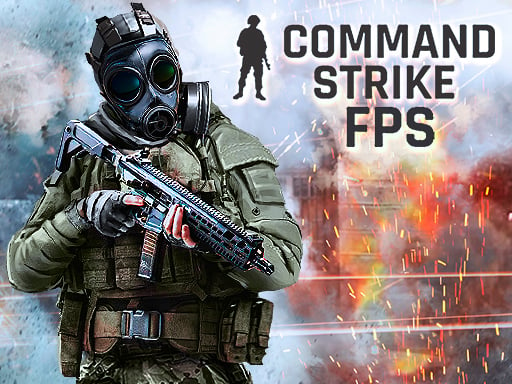
Command Strike FPS 2 delivers first-person military combat focused on tactical movement, firefights, and mission completion. Players step into commando battlefields featuring offline modes such as Deathmatch, Flag Capture, and objective-based Missions. Using an arsenal of guns, pistols, grenades, and first aid kits, you navigate 3D battle arenas, clear hostile targets, and practice classic shooter positioning across diverse battle maps.
Set across varied combat maps, Command Strike FPS 2 brings traditional first-person shooter action directly to the web browser. The core loop revolves around deploying into distinct battle zones, selecting effective weapons, and taking down opposing combatants across different encounter formats. Whether you choose the continuous firefights of Deathmatch, the territorial objectives of Flag Capture, or structured commando Missions, each match tests your spatial awareness and reaction speed.
During each encounter, players balance mobility and defense using keyboard and mouse inputs. Movement includes jumping to clear obstacles, squatting for lower visibility behind cover, tossing grenades into enemy groups, and deploying first aid kits when recovering from heavy fire. Switching between primary firearms and sidearms ensures you maintain sustained combat readiness across every engagement.
Your goal
The central objective in Command Strike FPS 2 depends on your selected combat mode. In Deathmatch, the priority is eliminating opponents in sustained skirmishes; in Flag Capture, you work to secure designated points; and in Missions, you focus on fulfilling specific commando battle parameters. Across all matches, the player aims to stay alive by managing health with first aid kits, utilizing cover through crouching, and outshooting adversaries.
How to play Command Strike FPS 2
1. Select your preferred battle environment and game mode from Deathmatch, Flag Capture, or Missions.
2. Move through the 3D map using the WASD keys, navigating toward objective zones and enemy positions.
3. Aim down sights with the left mouse button and fire your equipped weapon using the right mouse button.
4. Rotate the scroll wheel to cycle between pistols and powerful guns as combat distances shift.
5. Press C to squat behind cover, Space to jump over terrain, and G to throw grenades at clustered targets.
6. Use H to activate a first aid kit when your health drops, and press Escape to open the game menu when needed.
Controls and device support
According to the official instructions, control the game on desktop using WASD for character movement, Space to jump, and C to squat. Aiming is bound to the left mouse button (M1) and shooting is bound to the right mouse button (M2). Cycle through your weaponry with the mouse scroll wheel. Throw grenades using G, use first aid kits using H, and open the system menu with Escape.
- Controls: Keyboard
- Device support: Browser
- Game frame: 800 x 600
Rules to keep in mind
- Three distinct offline modes govern match flow: Deathmatch focuses on direct eliminations, Flag Capture emphasizes zone control, and Missions present structured commando tasks.
- Weaponry includes both powerful guns and sidearm pistols, which players switch between using the scroll wheel during encounters.
- Utility tools support survival: grenades provide explosive area clearing (G) and first aid kits restore combat durability (H).
- Tactical movement permits jump traversal (Space) and squatting (C) to alter your profile and leverage surrounding cover.
What makes the challenge interesting
Command Strike FPS 2 emphasizes traditional first-person shooter fundamentals: sight alignment, situational positioning, and utility timing. Because gunfights can occur at various ranges across 3D maps, players must constantly decide whether to advance aggressively or hold low ground by squatting behind obstacles. Balancing weapon selection is crucial, swapping to an appropriate firearm as combat spacing changes.
A key mechanical dynamic is managing health and utility during heated exchanges. Rather than relying solely on raw aim, successful commando runs require pressing H to deploy first aid kits before damage becomes critical and throwing grenades with G to disrupt enemy positions without exposing yourself directly to incoming fire.
Tips for Command Strike FPS 2
- Crouch behind low obstacles using C during open firefights. Squatting lowers your target silhouette, preventing avoidable damage when reloading or assessing enemy movements.
- Pre-aim corners with left-click aiming before rounding blind bends. Rushing into open corridors without aiming first leaves you vulnerable to stationed enemies.
- Deploy grenades using G against entrenched adversaries. Throwing explosives into occupied rooms softens targets before you enter, avoiding risky face-to-face exchanges.
- Monitor your health and activate first aid kits with H promptly after a shootout. Waiting until you are nearly defeated risks sudden elimination in the next skirmish.
- Rotate the scroll wheel to swap guns before running out of loaded ammunition. Switching to a sidearm is faster than reloading in the middle of a direct duel.
Stages and progression
Progress in Command Strike FPS 2 is structured across various battle maps and multiple game formats, including commando Missions, Flag Capture, and Deathmatch. As you move between different arenas, each map presents distinct sightlines, cover placements, and engagement distances that require adapting your combat style.
Players can practice their shooter fundamentals by starting in standard Deathmatch skirmishes to master weapon handling and mouse aim, before taking on objective-driven Flag Capture and specialized commando mission scenarios to test comprehensive combat skills.
Playing on different devices
Command Strike FPS 2 is designed with a dedicated desktop keyboard and mouse layout running in a standard 800 x 600 display resolution. Smooth mouse tracking is essential for aiming (M1) and firing (M2), while quick finger placement on WASD, C, G, and H ensures rapid tactical responses.
Using a physical mouse with a responsive scroll wheel makes weapon cycling seamless during firefights. Players should ensure their browser window maintains focus so key inputs like Space and Escape register without interruption.
The skills behind the game
Command Strike FPS 2 belongs to the 3D action shooter genre, combining real-time navigation, ballistic combat, and tactical positioning. First-person action titles in this space challenge players to scan three-dimensional environments, predict opponent movements, and coordinate simultaneous locomotion and gunplay.
By offering diverse match objectives like flag captures and commando assignments alongside straight combat, the game provides a versatile training ground for browser-based action fans looking to sharpen their spatial awareness and reaction timing.
Who will enjoy this game
Players looking for Command Strike FPS 2 often seek a straightforward, responsive 3D commando shooter that runs smoothly in modern web browsers without heavy downloads. It appeals to FPS enthusiasts who appreciate classic military themes, dedicated keyboard-and-mouse gunplay, and accessible combat encounters.
Whether jumping in for a quick round of Deathmatch or practicing tactical room clearing across mission scenarios, the game serves as an accessible casual combat arena for practicing basic crosshair tracking, cover discipline, and active item management.
Games with a similar feel
DOOM: Command Strike FPS 2 shares the foundational first-person shooter focus on 3D movement, weapon management, and fast enemy engagements found in classics like DOOM. However, while DOOM centers on intense sci-fi combat against monster hordes, Command Strike FPS 2 adopts a military commando theme with tactical tools like first aid kits, crouching, and flag capture objectives.
Frequently asked questions
What game modes are available in Command Strike FPS 2? Command Strike FPS 2 includes offline game modes such as Deathmatch for direct eliminations, Flag Capture for objective-based gameplay, and special commando Missions set across various maps.
How do I heal and throw grenades during combat? You can restore health by pressing H on your keyboard to use a first aid kit. To throw an explosive grenade at enemy positions, press the G key.
What are the primary aiming and shooting controls? Aiming down sights is assigned to the left mouse button (M1), while shooting your equipped weapon is performed with the right mouse button (M2).
How do I switch between different weapons? You can cycle between available firearms, including powerful guns and sidearm pistols, by rotating the mouse scroll wheel during a match.
Something not right?
Tell us if the game does not load, the information is wrong or the content needs review.
Report a problem ›