Official listing
Game description
Coma is an adventure game where you play as Pete and start your adventure to find your lost sister in Shill Bend.
Adventure game
Coma is a narrative-focused browser adventure where players step into the role of Pete on an emotional quest to find his missing sister across the mysterious region of Shill Bend. Combining side-scrolling platform movement with interactive conversational choices, the journey challenges you to traverse atmospheric environments, overcome physical terrain, and interact with characters along your path.
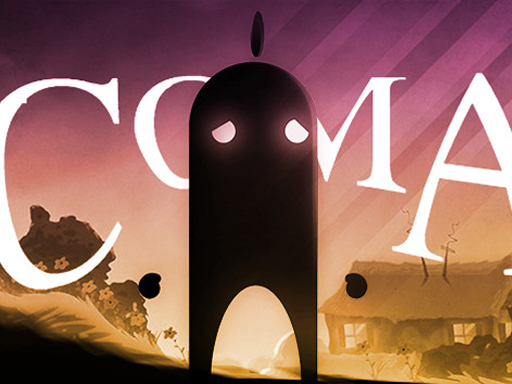
Choose Play now to load the game.
Official listing
Coma is an adventure game where you play as Pete and start your adventure to find your lost sister in Shill Bend.
From the game listing
Left and right arrow keys move Up arrow key jump Left-click choose the answers
Open this card to load the gameplay video.
Coma is a narrative-focused browser adventure where players step into the role of Pete on an emotional quest to find his missing sister across the mysterious region of Shill Bend. Combining side-scrolling platform movement with interactive conversational choices, the journey challenges you to traverse atmospheric environments, overcome physical terrain, and interact with characters along your path.
In Coma, players follow Pete as he embarks on an expedition through the distinctive world of Shill Bend. The core experience blends exploratory platforming with character interaction, creating a reflective atmosphere focused on discovery and storytelling. As Pete travels through unfamiliar territory, you must guide his footsteps across varied terrain while searching for clues regarding his lost sister.
Navigating the game requires coordinating keyboard movement with mouse interactions. You direct Pete horizontally through different scenes, leap across gaps and obstacles, and stop to engage with encounters where dialogue prompts appear on screen. Selecting answers during conversations allows you to gather information, interact with inhabitants, and continue Pete's journey across the quiet, moody world.
Your primary mission is to guide Pete safely through Shill Bend to uncover the whereabouts of his lost sister. To achieve this, you need to navigate challenging terrain, time your jumps across landscape gaps, and carefully select responses during dialogue encounters to maintain momentum through each narrative scene.
1. Use the Left and Right Arrow keys to guide Pete horizontally across the terrain of Shill Bend.
2. Press the Up Arrow key to jump over environmental elevations, ledges, and ground obstacles.
3. Approach characters or interactable points within the environment to prompt dialogue sequences.
4. Use the left mouse button to click and select conversational answers when dialogue options appear.
5. Continue exploring new areas to advance Pete's search for his missing sister.
Control Pete's horizontal movement using the Left and Right Arrow keys, press the Up Arrow key to jump, and use Left-click to choose answers during dialogue sequences.
Coma relies on a measured balance between steady platforming coordination and thoughtful narrative decision-making. Unlike fast-paced twitch action games, the gameplay rhythm encourages deliberate exploration. Players alternate between active physical traversal—managing jumps and timing movements across ledges—and quiet analytical moments where left-clicking the right dialogue option progresses the scene.
A key skill involves pacing your movement so you do not rush past important story cues or misjudge elevation changes. Keeping one hand positioned on the arrow keys while remaining ready with your mouse allows seamless transitions between platform navigation and dialogue choices, helping maintain the emotional and atmospheric flow of Pete's search.
Progression in Coma unfolds narratively as Pete ventures deeper into the setting of Shill Bend. As you traverse consecutive areas, you encounter new conversational scenarios and increasingly varied platform layouts that require careful jump timing and observant exploration.
A useful approach for mastering the adventure is to establish a calm, methodical routine. Focus on learning the jumping distances during early exploration, and pay close attention to story clues during dialogue interactions to smoothly track Pete's quest.
Coma is designed for desktop browser play at an 800 by 600 display resolution. The dual-input scheme utilizes the keyboard arrow keys for running and jumping alongside a mouse for selecting dialogue answers, making a standard keyboard and mouse setup ideal for comfortable navigation.
As an adventure and action title, Coma stands apart from high-speed reflex games by emphasizing atmosphere, environmental storytelling, and interactive dialogue. The genre appeal lies in exploring unfamiliar landscapes, connecting with memorable characters, and following an emotional quest step by step.
By integrating platform jumps with mouse-driven conversation prompts, the title offers casual adventurers an accessible yet engaging journey that rewards curiosity, patience, and attentive reading as Pete navigates the paths of Shill Bend.
Players looking for a memorable adventure game online will find Coma an engaging experience focused on storytelling and exploratory platforming. Whether discovering the coma game for the first time or revisiting classic browser quests, it offers an approachable session that can be played in short sittings.
The game suits casual players who enjoy narrative adventures, atmospheric art, and thoughtful exploration over intense combat mechanics, providing a gentle yet intriguing world to unravel.
What is the story premise of Coma? In Coma, you take on the role of Pete as he journeys through the surreal and atmospheric landscape of Shill Bend to search for his lost sister.
How do you control Pete's movement and jumping in the game? You move Pete left and right across the world using the Left and Right Arrow keys, and make him jump by pressing the Up Arrow key.
How do you interact with dialogue choices in Coma? When conversational options appear on screen, use your mouse to Left-click your chosen answer and proceed with the narrative.
What genre experience does Coma offer online players? Coma provides an atmospheric side-scrolling adventure combining platform navigation, environmental traversal, and story-driven dialogue interactions in a web browser format.
Tell us if the game does not load, the information is wrong or the content needs review.
Report a problemExplore popular games by category, shared tags and site-wide activity.





















