About Colored Jumper
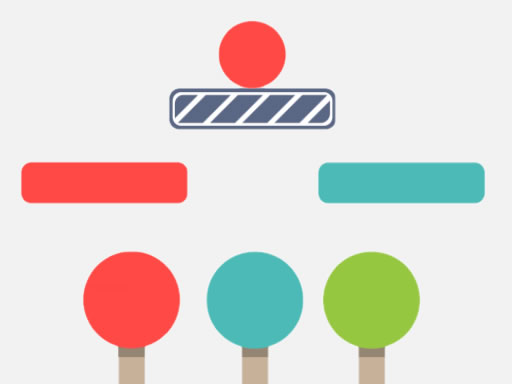
Colored Jumper is a fast color-matching arcade challenge where each click or tap makes the ball fall toward moving platforms. Use the three colored levers at the bottom to match the plane below, keep the ball bouncing, and build points without letting it slip through.
In Colored Jumper, the player provokes a ball to fall by clicking or touching the screen while a chain of platforms moves underneath. The ball must strike a plane that matches its own color; when it does, it bounces and earns points. At the bottom of the screen are three colored levers with round keys, and clicking them changes the colors of the planes. If the ball meets a different color, it simply falls down and the game ends, with the maximum value saved in game memory.
Your goal
The goal is to keep the ball alive by making every landing hit a platform of the same color. Time each drop, use the three bottom levers to change plane colors, and turn successful bounces into points while avoiding a mismatch that ends the run.
How to play Colored Jumper
1. Start a run and use the stated input: click the mouse or touch the screen to make the ball fall.
2. Watch the chain of platforms moving under the ball and note which plane is directly below.
3. Use the three colored levers with round keys at the very bottom to change the colors of the planes.
4. Try to land the ball on a plane with the same color so it hits, bounces, and gains points for you.
5. If the ball reaches a plane of a different color, it falls down and the game ends; the maximum value is saved in memory.
Controls and device support
The source instruction is: "Use mouse or touch the screen"; no more specific key or device mapping is provided.
- Controls: Mouse or touch
- Device support: Desktop + mobile
- Game frame: 1080 x 1920
Rules to keep in mind
- A bounce is successful only when the ball hits a plane that is the same color as the ball itself.
- If the platform color does not match, the ball falls down and the game ends immediately.
- Platform colors are changed through three colored levers with round keys positioned at the very bottom.
- Points come from successful jumps, and the maximum value is saved in the game memory.
What makes the challenge interesting
The challenge is a compact reaction loop rather than a long puzzle solution. Each click or tap commits the ball to a fall, so the useful skill is reading the moving platform chain before acting. The three levers add a second decision: changing the plane colors can set up the next bounce, but a wrong color still ends the run. Its casual, hypercasual tags fit short attempts built around timing, color recognition, and trying to beat the saved maximum.
Tips for Colored Jumper
- As advice, pause your eyes on the platform directly under the ball before tapping; the description makes color matching the condition for a safe bounce.
- As advice, keep attention near the bottom levers between drops, because those round keys are the stated way to change plane colors.
- As advice, favor a safe matching bounce over a risky drop, since a mismatched color makes the ball fall and ends the game.
Playing on different devices
The listing is portrait-oriented at 1080 x 1920 and is tagged Mobile, while the instructions allow either mouse use or touching the screen. No additional device requirements or device-specific behavior are stated.
The skills behind the game
Colored Jumper sits in the Puzzles category, but its tags also point to casual, hypercasual, color, jumping, kids, and one-player play. The described loop supports that blend: simple input, quick reactions, color recognition, and short scoring attempts rather than complex rules.
Who will enjoy this game
Natural phrases for this page include colored jumper, colored jumper game, and puzzle game online. They fit because the title is Colored Jumper, the category is Puzzles, and the play described is an online-style color reaction game about dropping, matching, and bouncing for points.
Frequently asked questions
How do you play Colored Jumper? Use the mouse or touch the screen to make the ball fall toward the moving platforms. Change plane colors with the three bottom levers and try to land on a matching color for a bounce and points.
What ends a run in Colored Jumper? A run ends when the ball reaches a plane that is not the same color as itself. Instead of bouncing, the ball falls down, so matching the platform color before the drop is the key safety check.
Does Colored Jumper save a high score? The description says successful jumps gain points and that the maximum value will be saved in the game memory. It does not describe leaderboards, levels, or other progression beyond that saved maximum.
Something not right?
Tell us if the game does not load, the information is wrong or the content needs review.
Report a problem ›