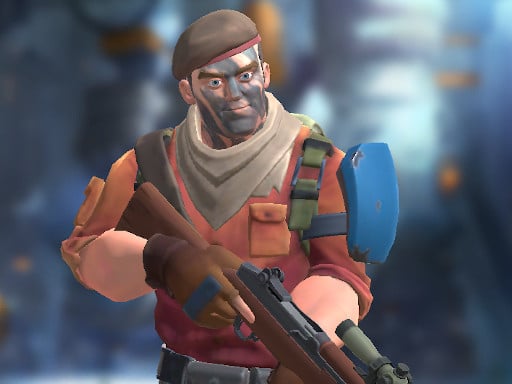
About CobraZ io
CobraZ io is an action-oriented first-person shooter built for rapid online multiplayer combat in your desktop browser. Players jump into active combat arenas to battle opponents across multiple match formats, including Team Deathmatch, chaotic Free For All, and objective-based Capture The Flag. By combining standard movement techniques like sprinting and sliding with precise mouse aiming, the game challenges you to outmaneuver rivals and secure team victories.
CobraZ io drops players directly into real-time gunfights where quick reflexes and steady positioning dictate every encounter. Operating within a classic arena shooter framework, matches revolve around fluid traversal, quick weapon switches, and coordinated skirmishes against opposing players. Whether you enter a match solo or fight alongside a squad, success relies on tracking targets through iron sights, managing your weapon inventory, and utilizing tactical tools such as thrown grenades.
The game provides a competitive playground with four distinct game modes, highlighting structured squad fights in Team Deathmatch, solo survival in Free For All, and positional coordination in Capture The Flag. Players can customize their soldier with various gear choices to suit their tactical approach before entering the arena. The overall experience emphasizes responsive gunplay, close-quarters awareness, and rapid movement adjustments during intense firefights.
Your goal
The primary objective in CobraZ io depends on the selected match mode. In Free For All, your aim is to eliminate every rival combatant in sight to claim personal dominance. In Team Deathmatch, players work together to tally more eliminations than the opposing squad before the round concludes. In Capture The Flag, the goal shifts toward tactical coordination, requiring your squad to penetrate enemy territory, secure their flag, and bring it safely home while defending your own base.
How to play CobraZ io
1. Choose your desired combat mode from the main lobby, selecting between Team Deathmatch, Free For All, or Capture The Flag.
2. Customize your soldier and select your preferred loadout gear before heading out onto the battlefield.
3. Navigate the map using the WASD or arrow keys, sprinting with Left Shift and sliding under fire with the Space bar.
4. Align your crosshair onto opposing targets using your mouse, right-clicking to aim down sights for tighter precision.
5. Press the Left Mouse button to fire your weapon, switching arms with number keys 1, 2, and 3 as combat distances change.
6. Clear entrenched positions by pressing G to launch a grenade, or use E or F to interact with dropped weapons on the ground.
Controls and device support
Movement uses WASD or Arrow keys. Left Mouse button fires, Right Mouse button aims down sights, Space slides while moving, and Left Shift activates running. Number keys 1, 2, and 3 swap weapons, E or F interacts with weapons, and G throws a grenade. Key H is also bound in the game settings.
- Controls: WASD + arrow keys
- Device support: Browser
- Game frame: 960 x 600
Rules to keep in mind
- In Free For All mode, every combatant on the map is an active adversary with no friendly teammates.
- In Team Deathmatch, eliminations contribute to your team's collective score against the opposing squad.
- Capture The Flag matches require defending your home base while infiltrating enemy lines to retrieve their flag.
- Sliding mechanics require active forward movement before triggering the slide with the Space key.
What makes the challenge interesting
The core gameplay of CobraZ io revolves around balancing rapid movement with steady shot placement. Sprinting with Left Shift allows players to quickly reposition across exposed sightlines, but rushing forward blindly leaves you vulnerable to entrenched opponents. By combining sliding with the Space bar, agile players can lower their profile during open skirmishes, evading incoming fire while lining up counterattacks through right-click aiming.
Weapon management introduces a critical tactical tradeoff. Cycling through number keys 1, 2, and 3 ensures you have the right tool for engagement ranges, while pressing E or F lets you swap equipment on the fly. Knowing when to commit to a primary rifle duel versus deploying a grenade with the G key to flush out entrenched opponents often determines who controls key chokepoints.
Tips for CobraZ io
- Aim down sights with the Right Mouse button before firing at long-range targets to stabilize bullet spread, avoiding the mistake of spraying wildly from the hip.
- Use the Space slide while sprinting across open doorways to make yourself a harder target, rather than running across lanes in a straight, predictable line.
- Switch quickly between weapons using the 1, 2, and 3 keys instead of waiting through long reload animations in the middle of an intense firefight.
- Toss a grenade with G into contested rooms or around tight corners before advancing, preventing dangerous ambushes from waiting enemies.
- Coordinate your routes with teammates during Capture The Flag matches, ensuring one group guards your home base while runners pursue the enemy flag.
Stages and progression
Progression in CobraZ io is anchored around soldier customization and mastering the varied match conditions. Players configure their soldier loadouts with available gear to adapt to specific playstyles, whether prioritizing rapid skirmishing or defensive area control. Without fixed linear campaigns, personal development centers on building map familiarity, optimizing slide-shooting timings, and refining tactical coordination across the four offered multiplayer modes.
Playing on different devices
CobraZ io is designed specifically for standard desktop keyboard and mouse inputs. Navigating smoothly requires simultaneous two-handed coordination, using WASD or arrow keys with your left hand for directional movement, sprinting with Left Shift, and sliding with Space. Your right hand controls camera orientation, sight targeting with the Right Mouse button, and weapon firing via the Left Mouse button.
The skills behind the game
As a member of the online shooting and first-person shooter genres, CobraZ io taps into the classic appeal of fast-paced arena combat. Players drawn to online action titles often look for clean mouse aiming mechanics, immediate respawns, and clear competitive objectives. The inclusion of squad play alongside solo formats allows players to alternate between pure target practice and structured tactical collaboration.
Who will enjoy this game
Players searching for cobraz io or an accessible shooting game online are generally seeking quick multiplayer matches without heavy client installations. CobraZ io fulfills that desire by delivering instant browser-based rounds where you can practice crosshair placement, experiment with movement sliding, and enjoy friendly competition across popular FPS formats.
Games with a similar feel
DOOM: Like the legendary classic DOOM, CobraZ io emphasizes fast-paced first-person shooting where constant movement and aggressive weapon handling are essential. However, while DOOM is famous for intense single-player dungeon runs against demonic hordes, CobraZ io focuses entirely on competitive online multiplayer matches with team objectives, player customization, and tactical cover mechanics like sliding.
Frequently asked questions
What game modes are available in CobraZ io? CobraZ io features four distinct match modes, including squad-focused Team Deathmatch, Free For All where every combatant fights alone, and objective-driven Capture The Flag.
How do you slide while moving in the game? To perform a slide, gain momentum by moving with the WASD or arrow keys and then tap the Space key. This lets you duck low while maintaining forward movement.
Can I pick up or swap guns found on the battlefield? Yes, you can interact with weapons on the ground by pressing either the E key or the F key when standing near them, expanding your tactical options during combat.
Can you customize your soldier in CobraZ io? Yes, the game lets players customize their soldier and select gear before jumping into multiplayer matches, allowing you to tailor your loadout for different modes.
Something not right?
Tell us if the game does not load, the information is wrong or the content needs review.
Report a problem ›