Official listing
Game description
City Parking is a fun 2D parking game with amazing graphics. There are many challenging levels with unique experiences. Play City Parking now for a great car parking simlation!
Boys game
City Parking 2D is a top-down driving and parking game where players maneuver a vehicle through challenging urban environments. By steering your car with precision across various distinct levels, you experience a focused 2D parking simulation designed to test spatial navigation, careful throttle management, and accurate vehicle placement without relying on complex controls.
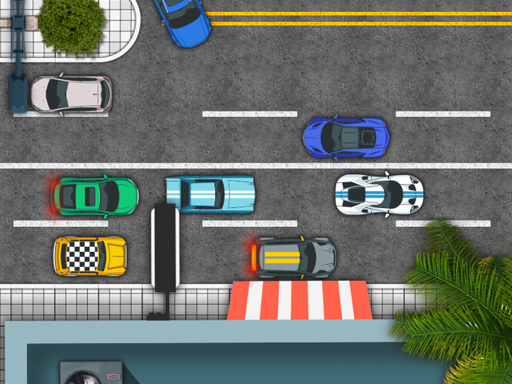
Choose Play now to load the game.
Official listing
City Parking is a fun 2D parking game with amazing graphics. There are many challenging levels with unique experiences. Play City Parking now for a great car parking simlation!
From the game listing
WASD or arrow keys to control car
Open this card to load the gameplay video.
City Parking 2D is a top-down driving and parking game where players maneuver a vehicle through challenging urban environments. By steering your car with precision across various distinct levels, you experience a focused 2D parking simulation designed to test spatial navigation, careful throttle management, and accurate vehicle placement without relying on complex controls.
City Parking 2D presents a classic arcade-style car parking simulation built around clean top-down driving mechanics. Players are tasked with steering their vehicle into designated spots across multiple stages, each offering distinct obstacle layouts and tight spaces to negotiate. The game emphasizes steady control and spatial awareness rather than high-speed racing, requiring drivers to carefully align their vehicle using responsive keyboard inputs. With vibrant 2D visuals and a direct focus on navigating tight urban courses, each level delivers a standalone maneuvering challenge that encourages thoughtful, deliberate movement to reach the goal successfully.
The primary goal in City Parking 2D is to guide your car safely from its starting position into the designated parking spot across every challenging level. Players must maneuver around barriers, maintain alignment, and successfully bring the car to a stop within the target area without colliding into surrounding hazards or veering off course.
1. Launch City Parking 2D in your desktop web browser.
2. Use the WASD keys or arrow keys to steer, accelerate, and reverse your car.
3. Navigate through the urban obstacles toward the designated parking space.
4. Align your vehicle accurately within the parking boundary to complete the stage.
5. Advance to subsequent challenging levels to tackle new parking layouts.
WASD / Arrow Keys: Control car
At its core, City Parking 2D focuses on low-speed precision handling and careful situational awareness. Unlike arcade racers that reward pure velocity, this simulation challenges players to judge turning radiuses, plan forward and reverse maneuvers, and respect the physical boundaries of each urban stage. Mastering the game involves gentle input modulation, aligning the vehicle's body squarely with parking markings, and anticipating turns well before entering narrow channels. Because each level introduces unique spatial configurations, maintaining a calm and methodical driving tempo is the key to steady progress.
City Parking 2D advances through a sequential series of challenging levels, each introducing fresh layouts and parking configurations designed to test player precision.
City Parking 2D runs in standard desktop web browsers at an 800 by 600 resolution and relies on keyboard controls.
Categorized under arcade and driving games, City Parking 2D emphasizes technical vehicle handling over breakneck speed. While traditional arcade driving titles often focus on high-speed drifting and overtaking competitors, parking-oriented titles offer a deliberate puzzle-like experience where patience, micro-adjustments, and spatial judgment are the central mechanics required to clear each stage.
As a dedicated car parking game, City Parking 2D delivers a focused 2D parking simulation experience. Players looking for an accessible city parking 2d game can enjoy instant browser-based play with straightforward keyboard inputs, making it an engaging option for enthusiasts who appreciate precision maneuvering challenges without complex setup requirements.
Car Parking Multiplayer: Like Car Parking Multiplayer, City Parking 2D focuses on the nuance of vehicle positioning and parking challenges. However, City Parking 2D offers a streamlined 2D single-player arcade experience rather than a 3D multiplayer simulation.
What keys are used to play City Parking 2D? You can steer, accelerate, and reverse your vehicle using either the WASD keys or the standard arrow keys on a desktop keyboard.
Does City Parking 2D feature multiple levels? Yes, City Parking 2D features many challenging levels, each presenting distinct layouts and obstacle arrangements for players to solve.
Tell us if the game does not load, the information is wrong or the content needs review.
Report a problemExplore popular games by category, shared tags and site-wide activity.