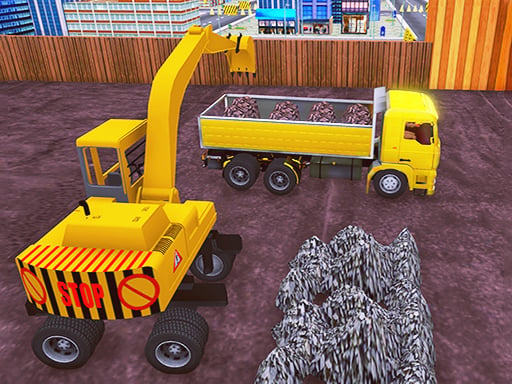
About City Construction Simulator Master 3D
City Construction Simulator Master 3D puts players behind the wheel of specialized municipal machinery to complete authentic road repair operations. Following on-screen directional indicators and helpful guidance tips, you navigate through city environments to reach damaged road sections and assist in the full restoration process from start to finish.
City Construction Simulator Master 3D delivers an engaging vehicle simulation centered on the vital work of urban road crews. Players take control of specialized heavy utility vehicles tasked with fixing broken asphalt and damaged thoroughfares across town. The experience combines responsive vehicle handling with structured task execution, requiring careful navigation through city streets.
By following the visual route arrows and in-game hints, you steer heavy work machines directly to repair zones. Each mission guides you through the practical steps of street maintenance, emphasizing steady driving, proper stopping, and disciplined maneuvering to complete essential city infrastructure tasks.
Your goal
The primary objective in City Construction Simulator Master 3D is to operate heavy construction vehicles and complete every stage of road maintenance. Follow the guiding arrows across the city map, reach target repair locations safely, and use your specialized machines to ensure broken streets are properly repaired.
How to play City Construction Simulator Master 3D
1. Launch the game and examine your assigned heavy construction vehicle ready for deployment on city streets.
2. Accelerate and steer using the WASD keys or the directional Arrow keys on your keyboard.
3. Follow the highlighted on-screen tips and directional arrows pointing toward the damaged road sections.
4. Engage the Space bar to apply brakes promptly and bring the machine to a secure halt at work zones.
5. Position your special machine over the designated repair area to assist in completing the road restoration process.
Controls and device support
WASD or Arrow keys: drive
Space: brake
- Controls: WASD + arrow keys
- Device support: Browser
- Game frame: 750 x 440
Rules to keep in mind
- Navigation follows designated visual arrows and guidance cues leading to active repair spots.
- Vehicular movement requires active input via standard directional driving keys to maintain transit speed.
- Stopping at target repair zones relies on deploying the dedicated handbrake control.
What makes the challenge interesting
Gameplay in City Construction Simulator Master 3D focuses on vehicle control, spatial awareness, and following navigational prompts. Piloting specialized heavy machinery requires adjusting your approach speed and planning wide turns appropriately. Rather than unrestrained racing, the core experience centers on steady movement, tracking guidance arrows across the 3D urban setting, and stopping cleanly at work sites using the dedicated brake control to successfully advance city road repair assignments.
Tips for City Construction Simulator Master 3D
- Keep your eyes on the directional arrows ahead to anticipate turns early and prevent overshooting designated street repair intersections.
- Tap the Space bar before reaching work markers so your heavy utility vehicle settles precisely over the damaged asphalt patch.
- Maintain steady driving speeds using WASD or arrow controls to ensure balanced handling around tight urban street corners.
The skills behind the game
Categorized under Action and vehicle simulation, City Construction Simulator Master 3D blends task-oriented driving with urban maintenance mechanics. Players experience the practical responsibilities of heavy municipal machinery operating in a 3D environment, offering an engaging take on practical public works challenges.
Who will enjoy this game
Players looking for a city construction simulator master 3d experience can explore realistic street restoration tasks. This city construction simulator master 3d game provides straightforward controls, while enthusiasts of an action game online will appreciate the focused vehicle handling and purposeful municipal objectives.
Frequently asked questions
What is the main goal in City Construction Simulator Master 3D? The main goal is to drive specialized construction vehicles across city streets following guidance arrows and tips to help repair broken road surfaces.
How do you control your vehicle in the game? You drive using the WASD keys or keyboard Arrow keys for steering and acceleration, and press the Space bar to brake.
How do you locate road repair sites? The game provides visual directional arrows and instructional tips on screen that point directly toward the locations requiring roadwork.
Something not right?
Tell us if the game does not load, the information is wrong or the content needs review.
Report a problem ›