About City Car Drive
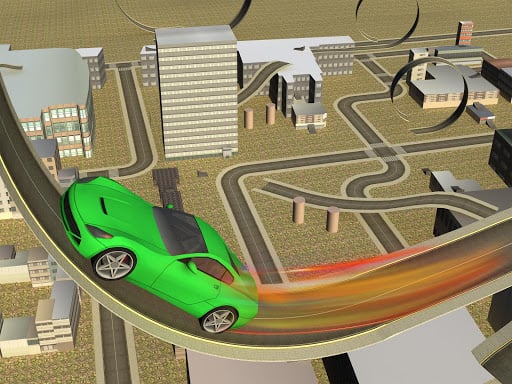
City Car Drive is a 3D urban driving simulation that lets players explore an industrial cityscape at their own pace. Roam undisturbed across excavated zones, past heavy machinery, and over sprawling bridges. With vehicles equipped with nitro boost, ramps for executing stunts, and customizable spawn settings, the game offers an open environment focused on automotive experimentation and relaxed cruising.
In City Car Drive, players immerse themselves in a distinctive mechanical environment defined by excavated dirt areas, heavy machinery, and a gritty factory atmosphere. Rather than forcing you onto linear race tracks, the game provides the freedom to navigate an open 3D urban playground without disruption.
You can select your preferred car and head straight into the streets to discover elevated bridges, steep ramps, and open roads. The vehicle handling supports stunts and tricks, bolstered by an onboard nitro system engineered to push your speed to its maximum threshold. Whether you want to practice high-speed runs or test vehicle dynamics off ramps, the simulation emphasizes casual, open-ended driving.
Your goal
The main objective in City Car Drive centers on open-ended exploration and stunt execution rather than finishing ahead of rival racers. Players aim to tour the entire industrial district, unleash nitro to discover maximum vehicle velocity, launch off ramps to perform mid-air tricks, and test how different cars handle across urban roads and excavated grounds.
How to play City Car Drive
1. Use the WASD keys to accelerate, steer, and reverse your car around the open city.
2. Press the O key to open the spawn settings menu and select or configure your vehicle.
3. Press the F key whenever you need to enter or exit your vehicle in the simulation.
4. Search the industrial surroundings to locate ramps, bridges, and open factory zones for executing stunts.
5. Activate your car's nitro boost along straight stretches to reach maximum driving speed.
6. Press the P key at any time to pause the simulation whenever you need a break.
Controls and device support
The game uses standard desktop keyboard keys for driving and menus. While nitro boost is available in-game, its dedicated input key is not specified in the primary instructions.
WASD: Drive car
F: Car in exit (enter/exit car)
P: Pause game
O: Open menu spawn settings
- Controls: See in-game controls
- Device support: Browser
- Game frame: 800 x 600
Rules to keep in mind
- Open-Ended Free Roam: Driving is completely undisturbed by strict timers or mandatory race checkpoints, allowing free exploration across the city.
- Vehicle Deployment: Players can access vehicle configuration through the spawn settings menu and switch between driving and exiting the car using dedicated keys.
What makes the challenge interesting
Gameplay in City Car Drive revolves around unrestricted freedom within an active industrial setting. The absence of strict race constraints lets drivers focus on vehicle physics, exploring industrial backdrops filled with machinery, and surveying excavated lots. Ramps and elevated bridges encourage creative driving, challenging you to line up high-speed jumps and recover smoothly on landing. Managing high speeds is a key part of the experience, especially when engaging nitro propulsion. Because you can stop, pause, and adjust spawn settings on demand, the title functions as a relaxed sandbox for car enthusiasts.
Tips for City Car Drive
- Align your car straight before hitting elevated ramps so your vehicle launches cleanly and lands upright without rolling over during stunt attempts.
- Save nitro bursts for long, flat industrial avenues and bridge spans to reach peak velocity safely without crashing into roadside machinery.
- Use the spawn menu with the O key to experiment with different cars and find the model best suited for city navigation and jumps.
The skills behind the game
As a 3D entry in the browser racing genre, City Car Drive departs from typical lap-based competitions by embracing free-roaming simulation design. Instead of competing against AI opponents or racing against the clock, players enjoy an open mechanical playground. This style of driving game appeals to players who prioritize relaxed exploration, vehicle testing, and creative stunt execution over rigid track rules and aggressive leaderboard positioning.
Who will enjoy this game
For players searching for a casual racing game online or an open-ended drifting game, City Car Drive provides an accessible 3D simulation experience. The title combines freeform exploration with vehicle speed trials, making it a fitting option for users looking to practice car handling, test jumps on stunt ramps, and navigate atmospheric industrial environments directly within a desktop web browser without complex installation steps.
Games with a similar feel
Asphalt: Like Asphalt, City Car Drive incorporates high-speed nitro boosts and ramp-based stunts that encourage daring maneuvers. However, Asphalt focuses on intense, competitive arcade races on closed courses, whereas City Car Drive offers a solo, undisturbed free-roam simulation through an industrial setting without scripted race events.
Frequently asked questions
What is the main goal in City Car Drive? There are no strict competition goals or ticking timers. Players are free to explore the industrial city, experiment with favorite cars, test top speeds using nitro, and perform stunts on ramps and bridges.
What controls are used to drive the car? Players navigate using the WASD keys on desktop browsers. Additional keyboard controls include P to pause the simulation, F to enter or exit your car, and O to access vehicle spawn settings.
Can City Car Drive be played on mobile devices? The provided game instructions specifically support desktop keyboard inputs like WASD, F, P, and O. Official touch screen mobile controls are not documented in the game specifications.
Something not right?
Tell us if the game does not load, the information is wrong or the content needs review.
Report a problem ›