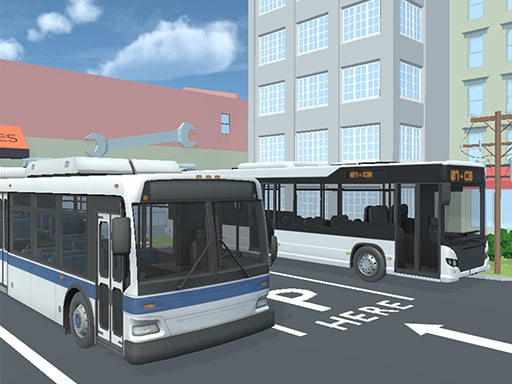
About City Bus Parking Challenge Simulator 3D
City Bus Parking Challenge Simulator 3D puts you behind the wheel of a commercial bus navigating complex cityscapes. Your core task is to guide a large vehicle through urban streets and maneuver it carefully into designated tight parking spots.
In City Bus Parking Challenge Simulator 3D, players take on the role of an urban bus driver navigating tight street layouts and structured city environments. Unlike lightweight passenger vehicles, driving a bus requires managing wide turning arcs, longer stopping distances, and constant spatial awareness.
Each driving run challenges you to guide the bus along urban pathways and align it cleanly inside designated parking bays. Success depends on careful acceleration, timely braking, and patient steering adjustments to fit the vehicle into tight spaces without clipping surrounding obstacles.
Your goal
The primary objective is to navigate your bus through city routes and execute smooth, accurate parking maneuvers in tight spots. You aim to complete each navigation course with steady vehicle control, avoiding collisions while achieving clean positioning in every target stall.
How to play City Bus Parking Challenge Simulator 3D
1. Launch the game in your browser window and familiarize yourself with the vehicle placement on the road.
2. Use the directional keys to accelerate forward and steer along the city roadways.
3. Slow down ahead of tight corners and approach angles to give yourself enough clearance for the vehicle's long wheelbase.
4. Identify your target parking bay and align the bus straight before attempting to pull in or back into the slot.
5. Press the Space bar to engage the brakes and bring the bus to a complete stop once properly positioned inside the spot.
Controls and device support
Drive and steer using WASD or the arrow keys, and press the Space bar to brake.
- Controls: WASD + arrow keys
- Device support: Browser
- Game frame: 800 x 600
What makes the challenge interesting
The defining skill in City Bus Parking Challenge Simulator 3D is vehicle dimension management. Long commercial vehicles require wider turning lines than standard cars, forcing players to swing wide on tight corners and plan their approach angles well before reaching the parking stall.
Balancing forward momentum with timely braking is critical. Tapping the directional keys and using the Space bar allows for micro-adjustments, ensuring the vehicle settles square within the parking boundary without overshooting.
Tips for City Bus Parking Challenge Simulator 3D
- Brake well in advance of tight corners. Tapping the Space bar early reduces momentum and prevents the rear end of the bus from swinging out into curbs.
- Take wide approach angles when turning into narrow streets. Cutting corners too sharply often causes the side of the bus to clip the inner corner.
- Straighten the steering before entering tight spots. Entering a narrow stall at an angle makes realignment much harder once the bus is partly inside.
- Use short steering taps rather than holding keys continuously. Controlled inputs provide steadier steering corrections on narrow city roadways.
Stages and progression
As you spend more time with the simulator, focus on refining your approach speed and turning precision across varied street layouts. Building consistency with early braking and wide angle entries will help you tackle narrower parking spots with greater confidence.
Playing on different devices
The game operates in a standard 800 x 600 display window on desktop web browsers. Players can choose between WASD or arrow keys depending on their hand preference, keeping the dominant hand free to press the Space bar for braking.
The skills behind the game
While cataloged broadly under racing games, City Bus Parking Challenge Simulator 3D focuses squarely on vehicle simulation and spatial parking challenges. Instead of racing against opponents for top speed, the gameplay emphasizes low-speed control, spatial awareness, and the careful maneuvering demanded by heavy urban transit vehicles.
Who will enjoy this game
Players looking for a car parking game or vehicle simulator online will find that City Bus Parking Challenge Simulator 3D offers a deliberate, methodical test of driving precision. It serves as an engaging browser session for anyone wanting to practice vehicle alignment, spatial judgment, and careful urban navigation without high-speed racing pressure.
Games with a similar feel
Asphalt: Unlike Asphalt, which centers on high-speed arcade racing and competitive track events, City Bus Parking Challenge Simulator 3D emphasizes low-speed precision and careful maneuvering through urban environments. Players looking for methodical spatial challenges rather than fast-paced racing will prefer this bus parking focus.
Car Parking Multiplayer: Both City Bus Parking Challenge Simulator 3D and Car Parking Multiplayer center on the challenge of maneuvering vehicles into parking spots. However, this game focuses specifically on the elongated wheelbase and wider turning arcs of a city bus, presenting a distinct vehicle-handling challenge.
Frequently asked questions
What keys are used to steer and brake the bus? You can steer and drive using either the WASD keys or the arrow keys. Pressing the Space bar applies the brakes to stop the vehicle.
What makes parking a bus different from a regular car parking game? Buses have a significantly longer body and wider turning radius than standard cars. This requires you to swing wider around corners and align your vehicle earlier when entering tight spots.
Do I need to download files to play City Bus Parking Challenge Simulator 3D? No downloads are required. The game runs directly in standard desktop browsers within its designated 800 x 600 window.
Something not right?
Tell us if the game does not load, the information is wrong or the content needs review.
Report a problem ›