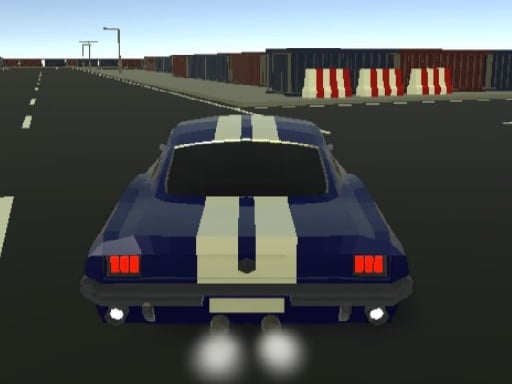
About Car Driving 3D Champ 2024
Car Driving 3D Champ 2024 puts players behind the wheel of high-performance vehicles navigating a dense metropolis. The core experience blends fast-paced driving, corner drifting, and urban navigation across roads populated with traffic and pedestrians. Whether tackling time-sensitive objectives, testing your reflexes against rivals, or simply cruising through streets at your own pace, maintaining vehicle control and clean lines around turns remains central to every run.
Set within a sprawling city environment, Car Driving 3D Champ 2024 offers varied driving activities ranging from timed missions and stunt opportunities to open street exploration. Players take control of various cars, each presenting distinct handling characteristics that influence steering response, acceleration, and slide control. The urban landscape presents continuous route decisions as you steer through active roadways, dodge unexpected street obstacles, and look for clear lanes to build speed.
Beyond straight-line driving, the experience emphasizes maneuvering skill. Negotiating sharp street intersections requires balancing standard steering with timely handbrake inputs to initiate drifts without spinning out. Customization and vehicle selection allow drivers to adapt their setup for specific driving goals, whether prioritizing stability through crowded boulevards or agility during tight cornering runs.
Your goal
The primary objective in Car Driving 3D Champ 2024 is to master city driving by completing challenge runs, executing controlled drifts, and reaching mission goals within required time limits. Success depends on maintaining high momentum while safely avoiding obstacles, pedestrians, and surrounding traffic across diverse city layouts.
How to play Car Driving 3D Champ 2024
1. Select your vehicle and review its specific handling traits before setting out onto the city streets.
2. Accelerate using the Up Arrow key and steer into traffic lanes using the Left and Right Arrow keys.
3. Apply the Down Arrow key to slow down smoothly or reverse when maneuvering out of tight spaces.
4. Engage the Space bar to pull the handbrake, allowing the rear wheels to break traction for sharp corner drifts.
5. Keep watch for pedestrians, obstacles, and moving traffic while racing against the mission clock.
Controls and device support
Steer and drive using the keyboard Arrow keys (Up to accelerate, Down to brake or reverse, Left and Right to steer). Press the Space bar to engage the handbrake for cornering and drifting.
- Controls: Keyboard
- Device support: Browser
- Game frame: 600 x 600
Rules to keep in mind
- Timed missions require reaching designated checkpoints or goals before the allotted clock expires.
- Collisions with city traffic, roadside barriers, or pedestrians disrupt vehicle trajectory and momentum.
- Engaging the handbrake at speed initiates a drift, requiring counter-steering to maintain directional control.
What makes the challenge interesting
The defining mechanical challenge in Car Driving 3D Champ 2024 is balancing sustained top speed against cornering precision. Because urban streets feature 90-degree turns and moving hazards, simply holding acceleration leads to frequent collisions. Drivers must develop an instinct for braking points and tap the handbrake early enough to slide cleanly through tight corners. Managing vehicle weight transfer during drifts ensures that the car aligns smoothly with the exit lane rather than oversteering into oncoming lanes.
Tips for Car Driving 3D Champ 2024
- Tap the handbrake briefly rather than holding it down continuously. Prolonged handbrake application stalls momentum and increases the chance of a full spin.
- Look ahead at incoming intersections to spot moving traffic patterns early. Anticipating lane blockages helps you choose a clean line without emergency braking.
- Counter-steer immediately as the rear wheels begin sliding during a drift. Straightening the front wheels stabilizes the car as you power out of turns.
- Experiment with different available vehicles to match your driving style. Some cars offer tighter cornering agility while others emphasize straight-line top speed.
Stages and progression
As players spend more time in Car Driving 3D Champ 2024, progression centers on tackling varied driving missions and refining performance across different vehicles. Exploring vehicle upgrades and testing alternate cars with distinctive handling traits allows drivers to build confidence through increasingly demanding city layouts. Practicing consistent drift angles and cleaner collision-free runs forms the primary path toward mastering every urban course.
Playing on different devices
Car Driving 3D Champ 2024 is configured for desktop keyboard play using standard Arrow keys for steering and propulsion alongside the Space bar for handbrake drifts. A physical keyboard provides immediate tactile feedback for rapid steering adjustments and quick handbrake taps during high-speed cornering.
The skills behind the game
Within the 3D racing and car game genre, urban driving titles stand out by offering open city navigation alongside traditional competitive challenges. Rather than being confined to closed circuits with predictable run-off areas, street driving games introduce traffic variables, tight city corners, and urban obstacles. This design tests a driver's ability to adapt routes on the fly while managing drift mechanics across realistic roadway grids.
Who will enjoy this game
Players looking for a responsive drifting game or an accessible racing game online will appreciate the direct keyboard controls and focused city challenges in Car Driving 3D Champ 2024. The blend of free cruising and structured missions offers a practical option for quick driving practice sessions or longer runs aimed at mastering handbrake drifts around tight corners.
Games with a similar feel
Asphalt: Like the Asphalt series, Car Driving 3D Champ 2024 focuses on fast-paced car driving and dynamic drifting mechanics. While Asphalt emphasizes high-speed arcade circuit racing and nitro-fueled events, this browser title centers on open city street driving, urban traffic navigation, and direct keyboard handbrake control suitable for quick sessions.
Frequently asked questions
What are the primary controls for driving and drifting? You drive using the keyboard Arrow keys: Up accelerates, Down brakes or reverses, and Left and Right steer. Pressing the Space bar activates the handbrake to initiate drifts.
What types of driving activities are available in the game? The game features timed missions, competitive races, stunt opportunities, and open city cruising, allowing players to practice drifting or explore urban streets at their preferred pace.
How do different vehicles handle in the game? Each car features distinct handling characteristics, affecting acceleration, steering responsiveness, and slide stability. Players can also explore upgrades and accessories to tailor performance.
Something not right?
Tell us if the game does not load, the information is wrong or the content needs review.
Report a problem ›