Official listing
Game description
Call of Ops 3 features next gen graphics and cool weapons to shoot rival players on different maps, your mission is to get the most frags in deathmatch game mode.
Shooting game
Call of Ops 3 drops players into fast-paced 3D deathmatch battles across diverse combat maps. Equipped with an arsenal of weapons, your task is to track down rival combatants and score frags. Featuring classic keyboard movement and precision mouse aiming, this browser-based shooter offers immediate, arena-focused action for anyone eager to test their tactical reflexes in hostile firefights.
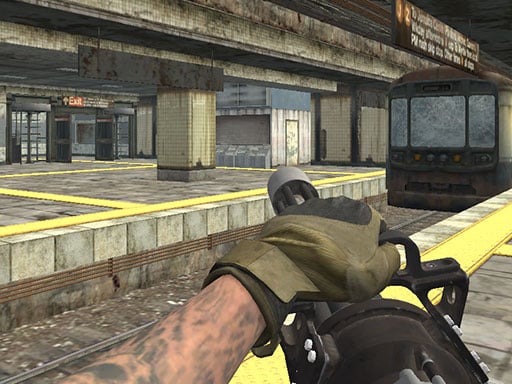
Choose Play now to load the game.
Official listing
Call of Ops 3 features next gen graphics and cool weapons to shoot rival players on different maps, your mission is to get the most frags in deathmatch game mode.
From the game listing
WASD - Move Space - Jump C - Crouch LMB - Shoot RMB - Aim R - Reload P - Pause menu 1 2 3 - Select weapon
Open this card to load the gameplay video.
Call of Ops 3 drops players into fast-paced 3D deathmatch battles across diverse combat maps. Equipped with an arsenal of weapons, your task is to track down rival combatants and score frags. Featuring classic keyboard movement and precision mouse aiming, this browser-based shooter offers immediate, arena-focused action for anyone eager to test their tactical reflexes in hostile firefights.
Call of Ops 3 is a first-person shooter running on WebGL and Unity3D technology that brings deathmatch combat directly to your browser window. Players navigate 3D environments equipped with multiple weapons to take on rival combatants in competitive skirmishes. The gameplay loop centers on constant movement, environmental navigation, and rapid target acquisition. Because matches prioritize scoring the highest frag count, participants must continually engage opponents while evading return fire. With responsive controls including sprinting, crouching, jumping, and precision aiming, every map encourages dynamic shootouts where quick target switching and tactical reloading dictate who stays alive and dominates the final scoreboard.
The main objective in Call of Ops 3 is to eliminate rival opponents and achieve the highest number of frags during the deathmatch mode. To win, you must navigate the arena efficiently, pick off enemies using your equipped weapons, survive incoming fire, and consistently outscore all other combatants across the map before the session concludes.
1. Use the WASD keys to navigate through the 3D map corridors, open arenas, and tactical vantage points.
2. Aim with the mouse and use right-click to bring up weapon sights for improved accuracy against distant targets.
3. Fire your active firearm by clicking the left mouse button whenever an enemy enters your field of view.
4. Switch between different firearms using the number keys 1, 2, and 3 depending on combat distance.
5. Press C to crouch behind cover or hit Space to jump across obstacles while pressing R to reload spent magazines.
WASD: Move character
Space: Jump
C: Crouch
LMB: Shoot
RMB: Aim
R: Reload
Gameplay in Call of Ops 3 revolves around active arena movement and split-second shooting mechanics. The deathmatch format keeps pressure constant, as lurking in one spot leaves you vulnerable from multiple flanking paths on different maps. Using right-click aiming tightens weapon spread, which is vital when challenging opponents at range. Meanwhile, crouching behind structures with C allows you to minimize your hit profile during heavy firefights. Managing your weapon selection with keys 1, 2, and 3 ensures you always hold an appropriate firearm ready for close-quarters ambushes or sustained corridor engagements.
Within the online shooting game genre, Call of Ops 3 belongs to the fast-paced 3D multiplayer deathmatch tradition. Browser shooters built on WebGL deliver immediate accessibility without large downloads, focusing on classic FPS staples like rapid target acquisition, map knowledge, and evasive movement. Call of Ops 3 channels tactical arena gameplay by combining multi-weapon inventories with traditional keyboard and mouse controls for authentic combat action.
Players looking for a call of ops 3 game will find a competitive shooting game online that emphasizes straightforward frag collection. The browser title provides instant access to 3D deathmatch action, allowing fans of traditional military shooters to jump straight into firefights across diverse layouts without setup hurdles.
DOOM: Like DOOM, Call of Ops 3 emphasizes first-person enemy encounters and persistent spatial mobility. However, while DOOM centers on surviving demonic monster swarms in single-player campaigns, Call of Ops 3 is structured around a competitive multiplayer deathmatch format where the sole objective is securing frags against rival players.
What is the main game mode in Call of Ops 3? Call of Ops 3 centers on a deathmatch game mode where players battle rivals on various maps to achieve the highest frag total.
How do you switch between different weapons? You can cycle through your available loadout by pressing the number keys 1, 2, and 3 on your keyboard during combat.
Can you play Call of Ops 3 with touch controls on mobile? The official instructions specify keyboard and mouse controls such as WASD movement and mouse aiming, with no mobile touch controls listed.
Tell us if the game does not load, the information is wrong or the content needs review.
Report a problemExplore popular games by category, shared tags and site-wide activity.




















