Official listing
Game description
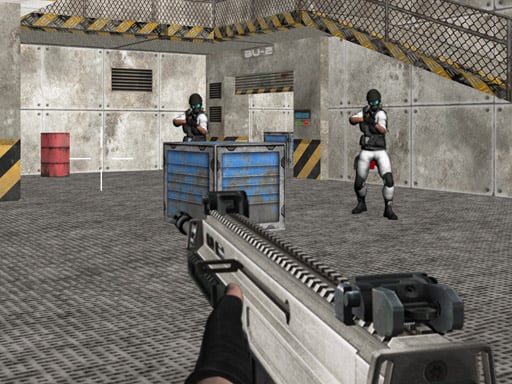
The second part of the 3D first person shooter Bullet Fury. Your troop has discovered the position of a new enemy laboratory. It's up to you to eliminate all the guards of the laboratory.
Shooting game
Bullet Fury 2 is a 3D first-person shooter where players infiltrate a newly discovered enemy laboratory. Tasked with neutralizing all hostile guards stationed inside the outpost, you must navigate 3D environments, track down opposing forces, and clear the facility using precise gunplay across desktop or mobile browser interfaces.
Choose Play now to load the game.
Official listing
The second part of the 3D first person shooter Bullet Fury. Your troop has discovered the position of a new enemy laboratory. It's up to you to eliminate all the guards of the laboratory.
From the game listing
Desktop Arrow keys or W A S D to move the character Mouse to turn the character aim and shoot L to lock pointer Mobile Use on-screen joystick to move fire button to shoot tap and drag on right side of the screen to aim and turn the character
Open this card to load the gameplay video.
Bullet Fury 2 is a 3D first-person shooter where players infiltrate a newly discovered enemy laboratory. Tasked with neutralizing all hostile guards stationed inside the outpost, you must navigate 3D environments, track down opposing forces, and clear the facility using precise gunplay across desktop or mobile browser interfaces.
Serving as the second installment in the Bullet Fury 3D action series, Bullet Fury 2 puts you directly on the front lines following your troop's discovery of a hidden enemy laboratory. Your mission is straightforward but dangerous: explore the facility corridors and eliminate every laboratory guard stationed across the base.
The game is built with full 3D shooter mechanics for browser play, featuring direct character movement and weapon aiming. Players must stay alert as they push through enemy territory, using quick reactions and accurate targeting to neutralize threats before being overwhelmed by the defending personnel.
The primary objective in Bullet Fury 2 is to locate and eliminate all enemy guards garrisoned inside the newly discovered hostile laboratory. To successfully fulfill your troop's mission, you must explore the compound's corridors, track down every opposing soldier, and neutralize all hostile forces until the entire military installation is completely cleared of resistance.
1. Start the game and lock your mouse cursor using the L key on desktop, or prepare touch controls on mobile.
2. Move through the laboratory corridors using W, A, S, D or the arrow keys, or the on-screen joystick on mobile.
3. Turn and aim your crosshairs by moving your mouse or dragging across the right side of your mobile screen.
4. Engage hostile guards by firing your weapon with the left mouse button or the dedicated on-screen fire button.
5. Search every sector of the laboratory until all enemy guards are eliminated.
Arrow keys or W A S D: Move the character
Mouse: Turn the character, aim, and shoot
L: Lock pointer
On-screen joystick: Move
Fire button: Shoot
Tap and drag on right side of screen: Aim and turn the character
Combat in Bullet Fury 2 centers on fast first-person positioning, swift target acquisition, and tactical corridor clearance. Navigating through the enemy laboratory requires players to balance continuous movement alongside precise crosshair control to react quickly to defending guards. Because hostile soldiers occupy different zones of the outpost, sweeping corners and maintaining clear firing angles are essential for survival. Players must aim accurately, adapt during active firefights, and systematically clear every section of the base to eliminate all laboratory guards.
As a 3D first-person shooting game, Bullet Fury 2 emphasizes real-time combat awareness and direct weapon handling. Browser shooter titles in this genre challenge players to master spatial navigation while engaging computer-controlled targets in confined environments. By combining responsive movement with precision aiming, the game delivers classic military FPS action accessible directly without extra downloads.
Players looking for a fast-paced shooting game online will find focused military combat in the Bullet Fury 2 game. The title delivers immediate browser-based FPS action centered on outpost clearance and tactical room clearing. Whether playing on desktop or mobile, Bullet Fury 2 offers straightforward gunplay focused entirely on eliminating enemy guards in a hostile laboratory setting.
DOOM: Bullet Fury 2 shares the first-person perspective and active combat movement associated with DOOM, challenging players to navigate 3D spaces and shoot enemies. However, Bullet Fury 2 focuses strictly on eliminating human guards in a military laboratory rather than battling supernatural forces across labyrinthine sci-fi maps.
What is the main goal in Bullet Fury 2? Your main objective in Bullet Fury 2 is to infiltrate the hostile laboratory discovered by your troop and eliminate every guard stationed throughout the military facility.
How do you lock the mouse pointer on desktop? Press the L key on your keyboard when playing on desktop to lock your mouse pointer, allowing for smoother crosshair aiming and character turning.
How do mobile controls work in Bullet Fury 2? On mobile, use the on-screen joystick to move, tap and drag the right side to aim, and press the fire button to shoot.
Tell us if the game does not load, the information is wrong or the content needs review.
Report a problemExplore popular games by category, shared tags and site-wide activity.





















