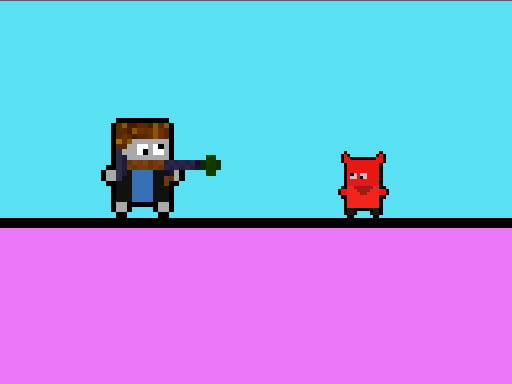
About Bruhlox
Bruhlox is a 2D browser action game that pits the titular hero against the menacing Red Devil across a hostile, obstacle-filled world. To clear a path forward, players must track down supply chests loaded with heavy RPG weapons and detonate brick walls blocking their passage. Blending retro platforming movement with explosive demolition, the game delivers quick, focused arcade encounters built around careful positioning and timely shooting.
Set in a stylized conflict zone, Bruhlox drops players into a single-player 2D adventure where navigation and demolition go hand in hand. The primary threat looming over the run is the evil Red Devil, challenging players to stay alert as they traverse the terrain. Rather than relying solely on agile footwork, survival depends on exploring the area to locate supply chests, which contain high-powered RPG launchers capable of blowing obstacles apart.
The core gameplay loop revolves around finding armament, clearing structural dead ends, and pressing deeper into the stage. Heavy brick walls routinely cut off progress, making the acquisition of heavy ordinance an operational necessity rather than an optional bonus. Each demolition shot clears room to maneuver, forcing players to balance steady movement with decisive fire.
Your goal
Your mission in Bruhlox is to survive the confrontation against the villainous Red Devil by scouring the area for weapon crates, securing an RPG, and completely demolishing the brick barriers that obstruct your route. Success requires methodically opening chests, conserving your fire for critical obstacles, and carving an open path across the stage while keeping clear of enemy hazards.
How to play Bruhlox
1. Start the run and maneuver Bruhlox across the 2D landscape using directional controls.
2. Scan the environment to identify the location of closed chests containing RPG weapons.
3. Approach and open the chests to arm your character with heavy explosive firepower.
4. Line up your shots against solid brick walls blocking forward pathways and trigger your weapon to blow them apart.
5. Navigate through the newly opened gaps while watching out for encounters with the evil Red Devil.
Controls and device support
On a computer, navigate using the Arrow Keys for directional movement and press the O key to fire your weapon. On mobile devices, interact directly using the touch screen display.
- Controls: Keyboard
- Device support: Desktop + mobile
- Game frame: 300 x 600
Rules to keep in mind
- Supply chests contain RPG weapons that can be collected to gain explosive firing capability.
- Brick walls cannot be bypassed on foot and must be blasted open using heavy weaponry.
- The Red Devil serves as the primary adversary in the game universe opposing Bruhlox.
What makes the challenge interesting
The defining dynamic of Bruhlox is the balance between methodical resource retrieval and decisive environmental destruction. Because brick walls serve as hard progression gates, roaming blindly without checking for equipment chests leads directly to dead ends. Players must develop a steady navigation rhythm, making chest retrieval their immediate priority before attempting to penetrate deeper into hostile territory.
Combat and demolition introduce a distinct mechanical tradeoff. Launching an explosive shot requires stable positioning and deliberate aim. Firing prematurely or misjudging clearance can waste an opening and leave the player exposed near barricades. Learning how to line up clean angles against structural blockages while monitoring open lanes creates a tight, satisfying tactical cadence.
Tips for Bruhlox
- Seek out weapon chests before venturing toward tight corridors. Rushing ahead without an RPG will leave you trapped at the first brick barrier you encounter.
- Come to a steady halt before pressing the shoot key. Firing while adjusting directional movement can cause your projectile to hit floor edges rather than center target.
- Create breathing room by clearing brick walls from a comfortable distance. Standing directly adjacent to a barrier limits your reaction time if hazards lurk on the other side.
- Keep your eyes scanning ahead for signs of the Red Devil. Anticipating enemy positions allows you to blast path obstacles before threats close the gap.
Playing on different devices
Desktop players operate with a traditional two-handed layout, guiding Bruhlox with the Arrow Keys while keeping an index finger poised over the O key for offensive blasts. This separation of hands supports prompt stops and steady projectile alignment. On mobile phones running Android or iOS, on-screen touch interfaces handle navigation and firing, making short sessions convenient on portable displays.
The skills behind the game
Bruhlox embodies the classic appeal of retro 2D arcade games, where direct mechanical clarity and brisk pacing take precedence over complex menus. By pairing platformer-style movement with explosive environmental destruction, it captures the spirit of war-themed side-scrollers. Players who appreciate straightforward objectives, clear spatial obstacles, and punchy combat loops will find its focused obstacle-clearing loop immediately accessible.
Who will enjoy this game
For players looking for a lightweight bruhlox game or exploring an action-oriented arcade game online, this title offers an uncomplicated session that boots directly in modern desktop and mobile browsers. It serves as an enjoyable quick-play option for casual gamers wanting immediate demolition action without having to navigate lengthy onboarding tutorials.
Frequently asked questions
How do you destroy brick walls in Bruhlox? Brick walls must be destroyed using explosive RPG weapons found inside supply chests scattered across the map. Standard movement cannot break through them.
What key is used to shoot on desktop? On a computer keyboard, use the Arrow Keys to steer your character and press the letter O to fire your weapon.
Can Bruhlox be played on mobile touchscreens? Yes, Bruhlox supports mobile play on Android and iPhone devices, allowing players to navigate and fire using direct touch screen inputs.
Something not right?
Tell us if the game does not load, the information is wrong or the content needs review.
Report a problem ›