About Bounce Run
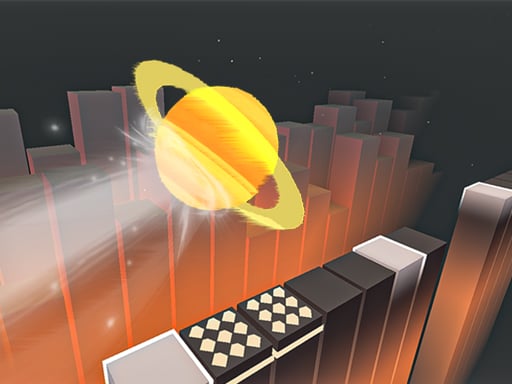
Bounce Run is a fast-paced running game where players guide an energetic character along an obstacle-filled path using responsive click or tap timing. Operating in a 3D perspective, the game challenges you to maintain momentum, navigate around hazards, and extend your overall distance. Long-distance survival rewards players with achievements that unlock cosmetic appearances, encouraging sharper reflexes and careful observation across every single attempt.
In Bounce Run, the gameplay centers entirely on forward movement, immediate obstacle avoidance, and distance preservation. As the character moves forward at elevated speed, hazards emerge along the route, requiring quick visual recognition and immediate physical reaction. The entire control scheme relies on mouse clicks or screen taps to execute movements, making early interaction intuitive while demanding steady concentration as your continuous run stretches onward.
The session loop revolves around pushing personal distance records. Traveling farther directly unlocks achievements, which in turn grant access to fresh visual appearances for your character. Because speed remains consistently rapid, success depends on keeping a clear view of approaching obstacles and timing each click carefully rather than acting on sudden panic. This combination of straightforward controls and cosmetic progression offers a satisfying rhythm for quick arcade sessions.
Your goal
The core objective in Bounce Run is to guide your character forward at rapid speed, successfully bypassing incoming obstacles to record the farthest distance possible. Every segment of track you survive builds toward your total distance score. By pushing deeper into the run and staying clear of hazards, you accumulate in-game achievements that unlock new character appearances, giving each run a tangible sense of progression and personal achievement.
How to play Bounce Run
1. Launch the game in your browser window and observe the course layout before initiating your initial forward sprint.
2. Use mouse clicks on desktop or finger taps on touchscreens to control your character as movement begins.
3. Focus your eyes toward the distant track ahead to spot oncoming obstacles before they reach your immediate path.
4. Time your clicks or taps precisely to dodge obstacles without losing your positioning or balance along the path.
5. Maintain your forward momentum as long as possible to reach deeper track milestones and earn additional achievements.
6. Check your accumulated achievements to unlock and equip new visual appearances for your running character.
Controls and device support
The supplier instructions specify clicking the mouse on desktop or tapping the screen on touch devices to play.
- Controls: Mouse or touch
- Device support: Desktop + mobile
- Game frame: 1600 x 900
Rules to keep in mind
- Travel as far as possible along the running track while steering clear of any obstacles in your route.
- Execute player actions exclusively through mouse clicks or touchscreen taps according to device availability.
- Reaching longer overall distances awards greater numbers of in-game achievements.
- New character appearances unlock progressively as you fulfill specific achievement milestones.
What makes the challenge interesting
The primary gameplay dynamic in Bounce Run lies in reconciling high forward speed with precision timing. Because the character moves rapidly through the 3D environment, the time window between spotting a hazard and initiating an evasive action is brief. Players must develop a steady visual discipline, looking slightly ahead of the character rather than focusing on the avatar itself. This anticipatory approach prevents erratic overcorrections that frequently occur when responding to hazards at the last possible fraction of a second.
Another defining aspect is the balance between continuous rhythm and sudden adaptation. A steady clicking or tapping tempo helps keep your fingers ready, but rigid patterns can cause accidental collisions when obstacle placements vary. Success requires players to maintain physical readiness while remaining completely flexible, adjusting input intervals the instant an unexpected obstacle enters the forward viewing lane.
Tips for Bounce Run
- Keep your gaze centered on the middle distance of the track. Looking directly at your character reduces reaction time, while looking ahead lets you register obstacle shapes earlier and prepare clean avoidance actions.
- Make deliberate, measured clicks rather than frantic double taps. Rushing your inputs often causes unexpected secondary moves that push you straight into consecutive hazards.
- Prioritize clearing the obstacle immediately in front of you before planning your next trajectory. Overthinking upcoming track segments can cause mistimed responses to the most pressing barrier.
- Take brief pauses between extended runs to maintain sharp visual focus. High-speed obstacle runners demand strong concentration, and eye fatigue can quickly degrade your split-second timing.
Stages and progression
Progression in Bounce Run is structured directly around distance milestones and cosmetic rewards. As you survive longer sprints, your extended distances translate into earned achievements. These achievements serve as the unlocking mechanism for alternative character appearances, letting you customize how your avatar looks during subsequent attempts. Rather than changing the basic rules, the system motivates players to continually refine their observation and reflexes to reach further benchmarks and collect every available look.
Playing on different devices
Bounce Run is built with an native aspect ratio of 1600 by 900 pixels, providing a widescreen presentation well-suited to modern desktop monitors and widescreen tablets. Desktop users benefit from the precision of a stable mouse click, while mobile and tablet users can utilize direct touchscreen tapping. Ensuring your browser window runs in full resolution without unnecessary background tabs helps maintain smooth frame pacing during rapid forward sprints.
The skills behind the game
Within the arcade genre, distance-focused running games emphasize immediate accessibility, low barrier to entry, and continuous reflex testing. Rather than managing complex inventories or deep multi-button combinations, games in this category distill the challenge into rhythm, timing, and split-second spatial judgment. Bounce Run fits firmly into this tradition by pairing simple click-and-tap mechanics with high-speed 3D obstacle avoidance, making it an engaging option for players who enjoy testing their reflexes in short, replayable bursts.
Who will enjoy this game
Players looking for an accessible bounce run game or a quick arcade game online typically prioritize immediate action without lengthy introductory tutorials. Bounce Run serves this casual playstyle well, offering a single-input setup that lets anyone immediately practice obstacle avoidance and reaction timing. Whether spending five minutes between tasks or working toward new visual customization milestones, the game provides an immediate, rhythm-driven loop that sharpens focus and rewards persistent practice.
Frequently asked questions
What is the primary objective in Bounce Run? Your primary goal is to guide your character along the course at high speed, avoiding all obstacles to achieve the longest possible distance. Longer distances unlock achievements and new character appearances.
How do you control your character during a run? The game utilizes minimal inputs: you can click using a mouse on desktop computers or tap the screen directly on mobile devices to navigate past incoming track hazards.
How do you unlock new character appearances? New visual appearances unlock naturally as you collect achievements. To earn more achievements, focus on surviving longer stretches of track and setting higher personal distance records.
Can I play Bounce Run on both desktop and mobile devices? Yes. Bounce Run supports both mouse clicks and touch taps, allowing smooth play across desktop browsers and mobile touchscreens with responsive single-input controls.
Something not right?
Tell us if the game does not load, the information is wrong or the content needs review.
Report a problem ›