About Blocky Zombie And Vehicle Shooting
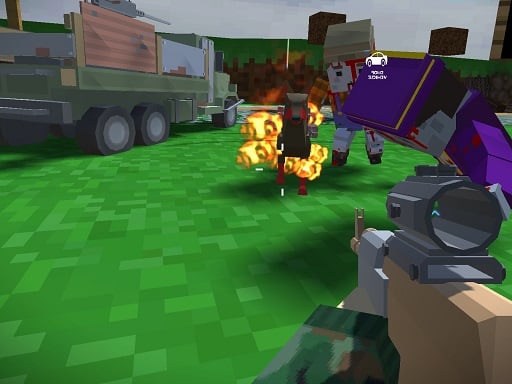
Blocky Zombie And Vehicle Shooting is a 3D pixel-styled action game that combines on-foot marksmanship with dynamic vehicle combat across single-player campaign missions and worldwide multiplayer matches. Players explore block-based battlegrounds, taking down hostile zombies on foot or climbing into armed cars to crush rival machines and opposing combatants in high-intensity combat arenas.
Blocky Zombie And Vehicle Shooting delivers flexible combat options across varied environments built in a distinct pixelated 3D aesthetic. Participants can jump into a dedicated single-player campaign centered on hunting down relentless zombie threats or connect with global competitors in intense multiplayer showdowns. Gameplay seamlessly transitions between boots-on-the-ground infantry action and vehicular warfare. While navigating on foot, combatants can aim, swap armaments, apply cosmetic weapon camouflages, and adjust tactical gun attachments on the fly to tailor their firepower for each skirmish. When encountering transport, players can immediately commandeer cars to speed across terrain, evade incoming aggression, and ram or blast opposing vehicles. This dual approach of mobile gunplay and direct vehicle driving creates a multifaceted combat loop where situational awareness and versatile loadout handling dictate survival against both undead hordes and rival human challengers.
Your goal
Your objective in Blocky Zombie And Vehicle Shooting depends on your chosen match type. In campaign encounters, your mission is to hunt down and eliminate hostile zombies across the map. In multiplayer lobbies, you aim to survive against players worldwide by destroying rival vehicles and outshooting competitors, utilizing available cars, weapon switches, and tactical weapon attachments to secure victory.
How to play Blocky Zombie And Vehicle Shooting
1. Select your preferred gameplay experience by choosing between the single-player zombie campaign and global multiplayer lobbies.
2. Navigate your character or steer your active car using the WASD movement keys to traverse the blocky arena.
3. Aim your perspective, fire weapons, or switch guns smoothly using your mouse controls to target incoming threats.
4. Press E beside any accessible automobile to climb in for vehicular combat, or press E again to safely exit on foot.
5. Customize your firearm during battle by pressing Q to change weapon camo or T to cycle weapon attachments.
Controls and device support
WASD: Drive vehicle or walk
Mouse: Look around, shoot, or change gun
E: Enter and exit car
Q: Change gun camo
T: Change attachments
- Controls: Mouse or touch
- Device support: Browser
- Game frame: 850 x 600
Rules to keep in mind
- Campaign mode tasks the player with tracking down and defeating zombie targets throughout the environment.
- Multiplayer mode pits players against international competitors to destroy enemy vehicles and eliminate rival combatants.
What makes the challenge interesting
Combat in Blocky Zombie And Vehicle Shooting revolves around the seamless balance between fast infantry movement and motorized vehicle assaults. Facing aggressive zombies or rival online players requires rapid tactical adjustments. Remaining on foot affords precision mouse aiming and the ability to adapt your weapon setup through attachments and alternate guns. Conversely, commandeering a vehicle gives an immediate speed advantage, enabling you to reposition quickly across open battlegrounds and smash through opposing machinery. Mastering when to dismount for steady shooting and when to jump behind the wheel to escape lethal crossfire forms the tactical core of every skirmish.
Tips for Blocky Zombie And Vehicle Shooting
- Mount vehicles whenever facing overwhelming numbers of zombies or distant players to gain rapid mobility and heavy defense across open grounds.
- Use weapon attachment customization with T to modify your combat effectiveness before challenging entrenched opponents or clustered zombie packs.
- Keep checking your surroundings with mouse camera control while walking to avoid getting ambushed from behind by fast-moving vehicles or sudden enemies.
- Dismount cars using E when entering tight quarters so you can aim more precisely and swap weapons as tactical demands shift.
The skills behind the game
As a multiplayer shooter title, Blocky Zombie And Vehicle Shooting incorporates real-time networked combat alongside focused solo campaign missions. Web-based multiplayer action titles typically emphasize immediate access, straightforward control configurations, and dynamic combat loops where players battle peers or coordinated NPC threats. By blending block-styled pixel visuals with simultaneous on-foot shooting and vehicular driving mechanics, the game offers varied engagement ranges and tactical adaptability across diverse arena engagements.
Who will enjoy this game
Players seeking blocky zombie and vehicle shooting experiences generally look for titles that combine arcade driving with responsive first- or third-person target elimination. Combining pixel art aesthetics with zombie survival and vehicular clashes caters to fans who enjoy fast session-based warfare. This title satisfies that interest by providing dual modes where players can test their marksmanship against walking undead or challenge international rivals with armed vehicles in browser-based multiplayer matches.
Games with a similar feel
DOOM: Blocky Zombie And Vehicle Shooting shares DOOM's intense focus on fast-paced weapon aiming and constant combat movement against hostile enemy encounters, but differentiates itself by integrating drivable sandbox vehicles, customizable attachments, and competitive online multiplayer arenas.
Frequently asked questions
Does Blocky Zombie And Vehicle Shooting support both single-player and multiplayer? Yes, the game offers a single-player campaign focused on hunting zombies as well as an online multiplayer mode where you compete against players worldwide in infantry and vehicle battles.
How do you enter and drive vehicles during a match? Walk up to an available car and press E to get inside. Once seated, steer and accelerate using the WASD keys, and press E again whenever you want to exit on foot.
Can you customize weapons while playing? Yes, while active in the match, you can press Q to swap weapon camo styles and press T to cycle through different gun attachments to modify your firearm.
Something not right?
Tell us if the game does not load, the information is wrong or the content needs review.
Report a problem ›