Official listing
Game description
Blocky Siege features cool pixel graphics and intense multiplayer battles with other players, play as special forces soldier and use three types of weapons to shoot rival players and win each round.
Shooting game
Blocky Siege is a 3D multiplayer action game that drops you straight into intense combat as an armed special forces operative. Featuring vibrant pixel graphics, the game challenges you to navigate battlegrounds, engage rival combatants across active rounds, and switch between three distinct weapons to outshoot opposing players.
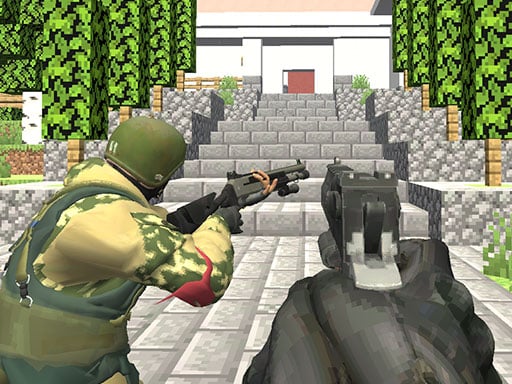
Choose Play now to load the game.
Official listing
Blocky Siege features cool pixel graphics and intense multiplayer battles with other players, play as special forces soldier and use three types of weapons to shoot rival players and win each round.
From the game listing
WASD - Move Space - Jump C - Crouch LMB - Shoot RMB - Aim R - Reload P - Pause menu 1 2 3 - Select weapon
Open this card to load the gameplay video.
Blocky Siege is a 3D multiplayer action game that drops you straight into intense combat as an armed special forces operative. Featuring vibrant pixel graphics, the game challenges you to navigate battlegrounds, engage rival combatants across active rounds, and switch between three distinct weapons to outshoot opposing players.
In Blocky Siege, players step into the boots of a soldier engaged in competitive online arena combat. Built with WebGL 3D pixel styling, the environment requires players to stay alert, move tactically, and engage opponents in direct firefights. You have access to three selectable weapon options, allowing you to adapt your firepower to short and medium distance skirmishes.
Matches test your situational awareness as you navigate terrain using jumps and crouches while managing ammunition. By taking careful aim, reloading during lulls, and eliminating competing soldiers, your focus remains on scoring decisive eliminations to secure victory in each battle round.
Your main objective in Blocky Siege is to defeat rival combatants and survive ongoing multiplayer skirmishes to win each round. Utilize your three available weapons effectively, land accurate shots with deliberate aiming, and eliminate opposing forces before they take down your special forces operative.
1. Navigate the 3D map using the WASD keys to move, jumping over obstacles with Space and crouching behind cover with C.
2. Switch between your three available weapons using number keys 1, 2, and 3 depending on your tactical situation.
3. Use the right mouse button to aim down your sights for greater accuracy, then press the left mouse button to fire at opponents.
4. Press R to reload your active firearm before your magazine runs dry, and open the pause menu with P if you need to adjust settings.
5. Eliminate competing players throughout the battle arena to survive and secure a round victory.
WASD: Move
Space: Jump
C: Crouch
LMB: Shoot
RMB: Aim
R: Reload
Gameplay in Blocky Siege centers on fast-paced tactical positioning and accurate marksmanship. Mastering movement keys allows you to maneuver fluidly around corners, while using the crouch command helps lower your profile against incoming enemy fire. Swapping seamlessly between your three weapon options ensures you are prepared for unexpected encounters at varying combat ranges.
Because multiplayer combat rewards quick reaction times, aiming down sights before opening fire dramatically enhances hit reliability. Timing your reloads when protected by map geometry keeps your weapon primed for incoming rivals.
Belonging to the 3D shooting genre, Blocky Siege emphasizes real-time reflexes, gunplay precision, and tactical spatial navigation. Browser shooters in this space typically combine accessible WebGL controls with competitive arena action, allowing players to jump straight into firefights without complex setup requirements.
If you are looking for a fast-paced shooting game online, the blocky siege game provides accessible multiplayer skirmishes with full keyboard and mouse shooter controls. Exploring blocky siege lets players test their aiming and movement skills against real opponents in voxel-inspired 3D battlegrounds.
DOOM: Like DOOM, Blocky Siege emphasizes direct combat movement, gunplay, and active weapon management, but Blocky Siege focuses on competitive multiplayer arena rounds rather than a single-player sci-fi demon campaign.
Minecraft: Blocky Siege shares the distinctive blocky pixel aesthetic seen in Minecraft, but focuses strictly on competitive multiplayer soldier firefights rather than open-ended sandbox survival and block-building mechanics.
How many weapons can I use in Blocky Siege? Players have access to three weapon types, which can be selected at any time using the 1, 2, and 3 keys on the keyboard.
How do you win a round in the game? You win rounds by engaging in multiplayer combat, outmaneuvering other players, and eliminating rival special forces soldiers across the map.
Tell us if the game does not load, the information is wrong or the content needs review.
Report a problemExplore popular games by category, shared tags and site-wide activity.




















