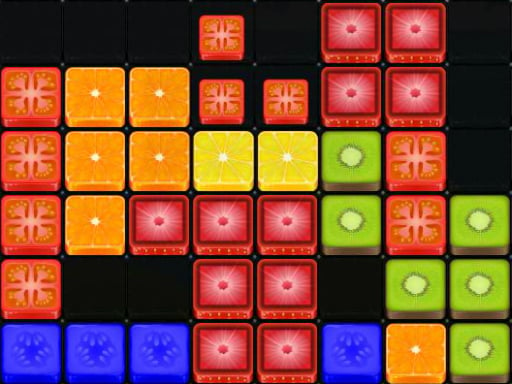
About Block It!
Block It! is a browser-based block puzzle game that challenges spatial planning and board management. Players pick up pre-formed sets of blocks and drop them onto a central grid to assemble complete rows and columns. When a full horizontal or vertical line of 10 blocks is assembled, that line is cleared from the board, opening space for subsequent shapes. The session continues as long as available block sets can fit onto the grid.
At its core, Block It! offers a methodical tile-placement experience where board awareness dictates how long a run lasts. Each turn presents players with sets of blocks that must be positioned across the playing surface. Unlike falling-block arcade games, the pace is deliberate, giving you time to evaluate the board layout before committing to a drop.
The primary interaction loop revolves around creating full lines of 10 blocks horizontally or vertically. As soon as a ten-tile span is formed, those blocks vanish immediately to free up critical surface area. Clearing multiple lines at once yields a higher score reward, introducing a classic risk-reward decision: clear space immediately to stay safe, or construct overlapping lines to trigger larger simultaneous clears. The game concludes when the board becomes too crowded to place any of the remaining block sets.
Your goal
The main objective in Block It! is to achieve the highest possible score by continuously clearing full 10-block horizontal and vertical lines. Players strive to keep the board open, prevent overcrowding, and maintain placement options so incoming block sets always have a valid spot to land.
How to play Block It!
1. Survey the board and inspect the currently available set of blocks ready to be placed.
2. Pick up a block set and move it over an open area on the board using your pointer or touch controls.
3. Drop the piece to occupy empty grid tiles, aiming to complete rows or columns.
4. Form an unbroken horizontal or vertical line of 10 blocks to remove those tiles from the board.
5. Aim to eliminate several lines simultaneously with a single placement to earn a higher score bonus.
6. Continue placing shapes and clearing lines for as long as valid open slots exist for your available block sets.
Controls and device support
Use your mouse or touch pad to pick up block sets and drop them onto the desired board positions.
- Controls: Mouse or touch
- Device support: Desktop + mobile
- Game frame: 800 x 450
Rules to keep in mind
- A horizontal or vertical line must consist of exactly 10 blocks to trigger removal from the board.
- Removing a higher number of blocks in a single placement awards more points to your total score.
- The session ends whenever you are unable to fit the existing block sets onto the crowded board.
What makes the challenge interesting
The gameplay focus of Block It! centers on spatial foresight and disciplined board geometry. Because pieces arrive in pre-arranged configurations, every move impacts not just immediate clearances but also future open space. The critical tension lies in managing board density. Leaving isolated empty tiles creates dead zones that prevent larger block sets from fitting later.
Balancing single-line maintenance against multi-line combo setups defines the player's strategic rhythm. Quick single-line clears keep the board spacious and resilient against awkward shapes, while building multi-directional 10-block completions rewards higher scoring at the cost of temporary grid congestion.
Tips for Block It!
- Keep the center of the board relatively open. Dropping awkward shapes around perimeter edges preserves larger central contiguous areas, reducing the risk of sudden lockouts when wide block sets appear.
- Plan around dual-axis completions. Aligning a placement to satisfy both a horizontal and vertical 10-block line clears extra tiles at once, boosting your score while simultaneously opening two crossing paths.
- Avoid leaving single disconnected empty slots. Filling fragmented holes is difficult with multi-tile block sets, so try to build flat, unified structures rather than irregular, jagged walls across the board.
- Assess all available block sets before making your first drop. Placing a smaller piece without checking the dimensions of your remaining pieces often blocks the only slot capable of fitting a larger shape.
Stages and progression
Block It! features a continuous survival structure rather than distinct level stages. The session progresses naturally through ongoing score accumulation as you clear successive 10-block lines. Difficulty scales dynamically through board congestion: as available open space fluctuates with each placement, finding valid positions for incoming block sets becomes progressively tighter.
A helpful practice approach is to set personal score benchmarks across multiple attempts. Focusing on clean grid recovery after tight pinches helps build reliable placement habits, enabling longer runs and higher composite scores over time.
Playing on different devices
Block It! is built using HTML5 technology and runs directly in standard web browsers on both desktop and mobile platforms. On desktop computers, players can interact using a physical mouse or laptop touchpad to pick up and place pieces precisely.
On mobile devices and tablets, the game supports direct touch input, allowing players to drag and drop block sets straight onto the grid. The standard 800 x 450 display format provides a clear view of both the board and available shapes.
The skills behind the game
Block It! sits firmly in the puzzle and arcade skill genre, drawing on familiar spatial arrangement fundamentals. Rather than testing fast reflexes or reaction speed under falling-piece timers, it emphasizes thoughtful positioning, board cleanup, and shape management.
HTML5 block puzzle titles of this style appeal to casual puzzle enthusiasts seeking accessible, session-based challenges. The skill requirement stems from balancing current space constraints against upcoming piece placement possibilities.
Who will enjoy this game
Players looking for a block it! game or an engaging puzzle game online will find an accessible format focused on clear spatial goals. The mechanics are quick to grasp for newcomers while offering strategic depth for players aiming to refine their line-clearing technique.
Because sessions run at your own pace without forced time limits between placements, Block It! serves well as a casual mental break or deliberate puzzle practice session on desktop and mobile browsers.
Frequently asked questions
How do you remove blocks from the board in Block It!? Blocks are removed whenever you complete a full 10-block horizontal row or vertical column. As soon as the tenth block fills the line, the entire line clears immediately.
What happens when you clear more than one line at the same time? Clearing multiple lines in a single placement removes more total blocks simultaneously, which awards a higher score bonus compared to clearing individual lines one by one.
When does a game session end in Block It!? The game continues until the grid becomes crowded and none of your current block sets can fit into the remaining open spaces on the board.
Can you play Block It! on both mobile devices and computers? Yes. Block It! runs in web browsers and supports mouse, touchpad, and mobile touch controls across compatible devices.
Something not right?
Tell us if the game does not load, the information is wrong or the content needs review.
Report a problem ›