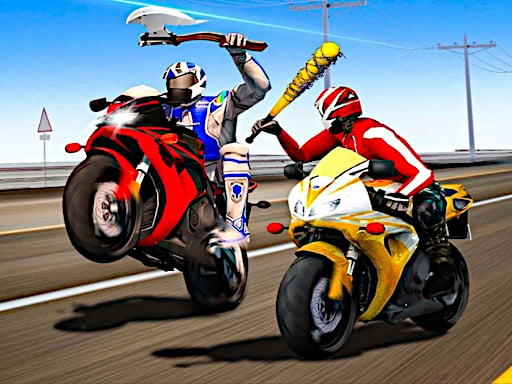
About Biker Battle 3D
Biker Battle 3D is a 3D highway racing and combat game where you take on challenging road missions on a super bike. As you speed along the highway, you must neutralize enemy riders on your left, right, and in front using kicks, bat attacks, and firearms while collecting gold to unlock powerful upgrades.
In Biker Battle 3D, players navigate high-speed highway traffic while fighting hostile opponents from the saddle of a motorcycle. The core gameplay challenges you to steer across lanes to line up combat strikes or dodge hazards. Combat options include ranged shooting, dual-direction bat swings, and side kicks to knock rivals off their bikes. Tactical maneuvers like activating nitro bursts let you catch distant adversaries, while slow-motion assists in lining up precise attacks during crowded encounters. As you complete highway missions and neutralize threats, you gather gold to spend in the shop on new rider skins, weapon upgrades, custom abilities, and unlockable chopper bike models.
Your goal
The primary goal in Biker Battle 3D is to conquer demanding highway racing missions by defeating rival bikers and staying upright on the road. You must eliminate hostile riders positioned in front of you or flanking your sides, earn gold from successful encounters, and invest your earnings to unlock upgraded abilities, fresh weapons, and new chopper bikes.
How to play Biker Battle 3D
1. Use the A and D keys or the Left and Right Arrow keys to steer your bike across highway lanes.
2. Eliminate hostile riders directly ahead of you by pressing F to shoot.
3. Strike adjacent enemies on your flanks with bat swings using T and Y or kicks using G and H.
4. Engage Nitro with Shift for rapid speed bursts, or press X to enter slow motion for precise timing.
5. Gather gold during runs to purchase new skins, abilities, weapons, and chopper bike models.
Controls and device support
A / D or Left / Right Arrows: Move bike left or right
F: Shooting
T / Y: Bat Attacks
G / H: Kick Attacks
Shift: Nitro
X: Slow Motion
- Controls: Keyboard
- Device support: Browser
- Game frame: 900 x 500
Rules to keep in mind
- Hostile bikers positioned ahead, to the left, or to the right must be neutralized using the matching directional attack or weapon.
- Gold collected during highway missions serves as the currency required to unlock skins, abilities, weapons, and chopper bikes.
What makes the challenge interesting
Success in Biker Battle 3D depends on splitting attention between driving lanes and choosing the right attack vector. Because enemies approach from the front as well as the left and right flanks, you must select appropriate attacks on the fly. Melee bat strikes and kicks handle close-range flankers, while ranged shooting addresses distant riders. Smart utilization of the slow-motion mechanic provides crucial reaction time in tight traffic, and nitro allows rapid repositioning to close gaps or escape dangerous clusters.
Tips for Biker Battle 3D
- Activate slow motion with X when approaching multiple opponents simultaneously to carefully time your bat swings or shooting without crashing.
- Match your attack to enemy spacing, using quick side kicks for immediate flankers and firearm shots for targets directly ahead in your lane.
- Save your nitro boost for straight highway sections or when you need to quickly catch up with escaping hostile bikers.
Stages and progression
Players progress through highway missions by collecting gold during combat runs. This accumulated currency can be spent in the garage to purchase new rider skins, upgrade weapons, unlock combat abilities, and acquire different chopper bike models to expand riding options.
Playing on different devices
The game runs in a 900x500 display window on desktop browsers and requires keyboard controls to operate steering, nitro, slow motion, and combat actions simultaneously.
The skills behind the game
As part of the 3D racing and vehicular combat genre, Biker Battle 3D combines standard highway driving with aggressive arcade fighting mechanics. Rather than focusing purely on lap times, vehicular battle titles demand split-second offensive maneuvers, obstacle avoidance, and tactical gear upgrades to overcome increasingly tough road encounters.
Who will enjoy this game
Players seeking a thrilling racing game online will appreciate how Biker Battle 3D merges super bike maneuvering with multi-directional road combat. In this biker battle 3d game, navigating busy highways while timing bat swings, kicks, and nitro bursts delivers an intense arcade experience centered on speed and precision combat.
Games with a similar feel
Asphalt: Like the Asphalt series, Biker Battle 3D emphasizes high-speed road navigation and nitro boosts, but it shifts primary focus toward direct physical motorcycle combat and weapon attacks rather than closed-circuit car racing.
Street Fighter: While Street Fighter focuses on technical one-on-one martial arts matches on stationary stages, Biker Battle 3D adopts directional melee striking and kick spacing within the context of a continuous, high-speed highway bike race.
Frequently asked questions
How do you attack enemies on the sides in Biker Battle 3D? Use keys T and Y to unleash left and right bat attacks, or press G and H to kick adjacent riders attempting to ram your motorcycle.
What can you buy with the gold collected during highway missions? Collected gold can be spent on unlocking new rider skins, purchasing weapon upgrades, acquiring special abilities, and adding new chopper bike models to your garage.
When should you use the slow-motion feature in Biker Battle 3D? Press X to activate slow motion whenever you enter dense traffic or face multiple surrounding rivals, giving you extra reaction time to aim attacks.
Something not right?
Tell us if the game does not load, the information is wrong or the content needs review.
Report a problem ›