Official listing
Game description
This is a brick breaker game with different levels and game modes. Classic, Double, 1024 and unlimited high score mode. There are some challenges to pass and unlock levels.
Puzzles game
Bare Ball is a dynamic 2D brick breaker puzzle arcade game featuring multiple distinct game modes. Players navigate bouncing balls to shatter blocks across Classic, Double, 1024, and unlimited high score modes. By tackling tricky obstacle setups, you can complete designated challenges and unlock fresh levels to test your reflexes.
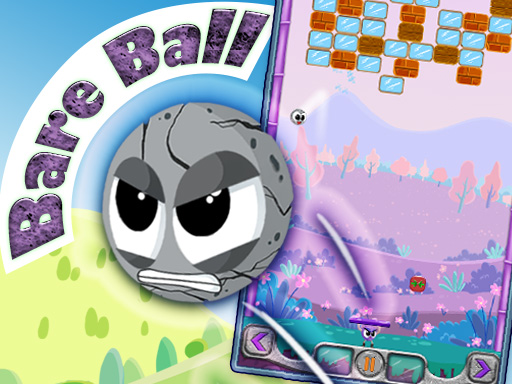
Choose Play now to load the game.
Official listing
This is a brick breaker game with different levels and game modes. Classic, Double, 1024 and unlimited high score mode. There are some challenges to pass and unlock levels.
From the game listing
Control modes 1 Full Touch Control that you can use touch or click everywhere to move Half Half 2 Button Control that you must touch or click two control buttons which is bottom corners of the screen Keyboard arrow keys ar
Open this card to load the gameplay video.
Bare Ball is a dynamic 2D brick breaker puzzle arcade game featuring multiple distinct game modes. Players navigate bouncing balls to shatter blocks across Classic, Double, 1024, and unlimited high score modes. By tackling tricky obstacle setups, you can complete designated challenges and unlock fresh levels to test your reflexes.
Bare Ball blends traditional arcade brick breaking with number and bounce puzzle mechanics. Players choose from multiple distinct play styles, including Classic mode, Double mode, a numbered 1024 mode, and an endless unlimited high score mode. In each session, your primary activity revolves around directing ball bounces to collide with bricks and clear obstacles off the screen. Different levels present specific layout configurations that require careful positioning and angle calculation. With support for both direct touch or pointer movement and corner-button controls, the game adapts to varied input preferences while challenging you to clear stages, beat personal records, and unlock new puzzle challenges.
The main goal in Bare Ball is to eliminate target blocks by deflecting balls and keeping them in play across various game modes. In standard and challenge modes, players must satisfy stage conditions to clear obstacles and unlock subsequent levels. In the unlimited mode, your objective is to sustain your run and accumulate the highest possible score.
1. Select a game mode from options including Classic, Double, 1024, or the unlimited high score mode.
2. Choose your preferred control scheme: full-screen touch/click, corner directional buttons, or keyboard arrow keys.
3. Steer your paddle to bounce the ball toward the blocks and keep it active in the play area.
4. Complete the stage challenges by breaking the required bricks to unlock new levels and advance.
5. Survive longer in unlimited mode to continuously rack up a higher score.
Left and Right Arrow Keys: Move paddle left and right
Mouse Click: Click anywhere on screen or click bottom corner buttons to steer
Full Touch Control (Touch anywhere): Touch or drag anywhere on screen to move
Button Control (Bottom corners): Tap the bottom left and right corner buttons to steer
Gameplay in Bare Ball centers on ball deflection angles and rapid reaction times across diverse game variations. Classic mode delivers standard brick demolition, while Double mode and the 1024 mode introduce unique layerings and number-based block clearing. The unlimited mode tests player endurance, challenging you to sustain prolonged bouncing without missing incoming balls. Choosing the right control layout—whether dragging freely across the screen or tapping dedicated corner buttons—allows players to optimize their precision for fast-paced rebounds.
Progression in Bare Ball involves tackling distinct challenges across various levels. Successfully meeting stage goals allows players to unlock new levels, while high score tracking in unlimited mode lets you gauge your ongoing improvement.
Bare Ball belongs to the arcade puzzle genre, building upon classic brick breaker mechanics with modern game mode variety. By incorporating numbered block concepts like 1024 alongside standard bounce challenges, the game combines quick-reaction arcade handling with strategic target selection. Players who enjoy spatial puzzles and fast paddle-and-ball mechanics will appreciate the blend of progressive level unlocking and high-score survival loops.
If you are searching for a versatile puzzle game online, the bare ball game offers multiple ways to enjoy brick-shattering action directly in your browser. From quick challenge-based level runs to endless scoring sessions, bare ball accommodates both casual players looking for simple bounce puzzles and dedicated arcade fans aiming to master every game mode.
What game modes are available in Bare Ball? Bare Ball features four distinct game modes: Classic mode, Double mode, 1024 mode, and an unlimited high score mode. Players can also clear specific challenges to unlock additional levels.
What control options does Bare Ball support? The game offers multiple control schemes: Full Touch Control to click or touch anywhere on the screen, Button Control using bottom corner buttons, and keyboard arrow keys for desktop steering.
How do you unlock new levels in the game? You can unlock new levels in Bare Ball by tackling and passing specific in-game challenges, clearing designated block layouts across the various level-based puzzle game modes.
Tell us if the game does not load, the information is wrong or the content needs review.
Report a problemExplore popular games by category, shared tags and site-wide activity.



















