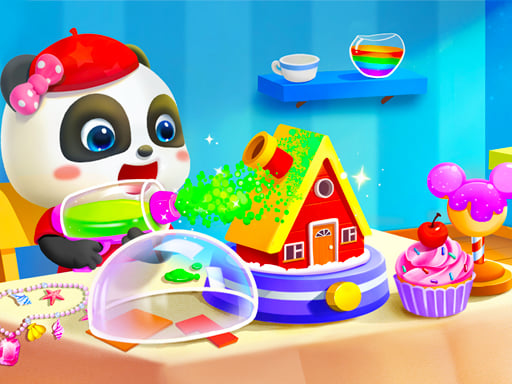
About Baby Panda Kids Crafts DIY
Baby Panda Kids Crafts DIY invites young players to explore creative handiwork in an engaging digital workshop. Guided by Baby Panda and accompanied by lively voice-over and smooth animations, players assemble exciting projects such as recycled vehicles, musical xylophones, and fruit-based candy canes. The experience emphasizes friendly, stress-free crafting that encourages imaginative tinkering and casual discovery.
Baby Panda Kids Crafts DIY centers on step-by-step crafting projects designed for casual and educational play. Players join Baby Panda in a colorful studio environment where everyday items transform into playful creations. Available activities include converting recycled household materials into cool toy vehicles, assembling and decorating a sophisticated xylophone, and turning fresh fruits into tasty candy canes.
The game creates an accessible atmosphere through smooth visual animations and cheerful voice-over guidance. Without strict time limits or harsh penalties, children and casual players can comfortably explore every stage of the handicraft process, building confidence through positive reinforcement and relaxing DIY tasks.
Your goal
The primary objective is to complete each chosen craft project from start to finish alongside Baby Panda. Players aim to assemble all required parts, decorate their creations, and practice step-by-step sequencing while discovering how distinct materials come together to form functional toys and musical instruments.
How to play Baby Panda Kids Crafts DIY
1. Select a DIY project from the main workshop menu, such as recycled vehicles, a xylophone, or fruit candy canes.
2. Listen to the voice-over instructions and observe the on-screen visual prompts to identify the next crafting task.
3. Click or tap on the highlighted crafting materials and drag them into position to assemble the base components.
4. Apply finishing touches and decorations to complete your handmade creation alongside Baby Panda.
Controls and device support
Interact with all crafting tools, materials, and menus using standard mouse clicks on desktop or screen taps on mobile devices.
- Controls: Mouse or touch
- Device support: Desktop + mobile
- Game frame: 800 x 504
What makes the challenge interesting
Baby Panda Kids Crafts DIY focuses on guided sequencing, creative exploration, and gentle motor skill practice. Each DIY craft breaks down a practical building project into clear, manageable steps. Instead of rushing against a countdown, players focus on following visual cues, identifying the appropriate tools for each material, and enjoying the sensory feedback of smooth animations and pleasant audio cues.
The core appeal lies in the satisfying transformation of raw supplies—like turning fruits into candy canes or discarded containers into vehicles. This fosters curiosity about how objects are made in the real world while offering a calming and accessible play loop suitable for younger audiences.
Tips for Baby Panda Kids Crafts DIY
- Listen closely to the audio cues and spoken directions before interacting to ensure each part is placed in the proper order.
- Take your time dragging items across the screen to avoid dropping materials before they snap into their intended slots.
- Explore every available craft type to experience the different interactive steps involved in building vehicles, instruments, and treats.
- Revisit completed crafts to try alternate decorating choices and reinforce understanding of the assembly process.
Stages and progression
Crafting sessions offer self-directed pacing where players can freely choose between building vehicles, tuning a xylophone, or crafting candy treats. Rather than unlocking tiers through high scores, progress is marked by exploring each craft project and mastering the multi-step assembly routines.
Players can structure their own practice sessions by rotating between different activities, aiming for smoother hand-eye coordination with the click-and-tap interface during each successive playthrough.
Playing on different devices
Running in an 800 by 504 canvas window, the game accommodates both desktop web browsers and touch-enabled mobile screens. Desktop users can navigate smoothly using precise mouse clicks and cursor drags.
On tablets and smartphones, direct touch input provides an intuitive experience for young children, allowing them to tap and slide crafting parts across the display effortlessly.
The skills behind the game
Educational crafting titles provide young learners with an interactive medium to understand assembly, design, and material reuse. By turning routine crafting activities into guided digital tasks, games in this genre foster curiosity, patience, and fine motor coordination.
Baby Panda Kids Crafts DIY blends colorful visuals, spoken instructions, and straightforward mechanics, making it an inviting digital play space for early learners seeking relaxing, creative entertainment.
Who will enjoy this game
Players looking for baby panda kids crafts diy or a family-friendly crafting experience will find an accessible workshop tailored for casual discovery. The guided projects provide an easy introduction to digital tinkering without demanding fast reflexes.
Engaging with the baby panda kids crafts diy game serves as an enjoyable practice activity for developing touchscreen and mouse familiarity while exploring cheerful DIY projects.
Games with a similar feel
Minecraft: While Minecraft offers an expansive sandbox where players gather resources and build freely within a 3D block-based world, Baby Panda Kids Crafts DIY delivers a guided 2D crafting experience with voice-over prompts. Players seeking structured, casual preschool DIY projects will appreciate Baby Panda's focused step-by-step activities.
Terraria: Terraria involves 2D resource gathering, exploration, and complex crafting systems in an open survival environment. In contrast, Baby Panda Kids Crafts DIY focuses on guided, penalty-free crafting projects like assembling xylophones and fruit treats, making it far more suitable for relaxed, early-learning gameplay.
Frequently asked questions
What kinds of items can you build in Baby Panda Kids Crafts DIY? Players can build toy vehicles out of recycled items, assemble a musical xylophone, and prepare candy canes using fresh fruit ingredients.
How do you control the crafting tools in the game? All crafting actions are controlled through simple mouse clicks on computers or direct screen taps on mobile devices and tablets.
Is there a time limit or score penalty during crafting? No, the game focuses on relaxing, educational DIY activities with voice-over assistance, allowing players to work at their own pace without timers or failure states.
Something not right?
Tell us if the game does not load, the information is wrong or the content needs review.
Report a problem ›