About Avatoon Avatar Maker
Avatoon Avatar Maker is a browser-based creative styling experience centered on personal expression and digital character design. Players jump straight into crafting expressive cartoon faces, styling distinct looks, and preparing lively profile graphics through intuitive point-and-click tools. Whether you want to assemble an artistic digital persona or test playful fashion combinations, the title provides an accessible canvas for customizing cartoon portraits directly in your browser.
In Avatoon Avatar Maker, the central activity revolves around cartoon character generation and makeover design. The tool set lets players transform ordinary concepts into colorful cartoon faces suitable for profile pictures, social media avatars, and role-playing fun. Instead of navigating high-pressure timers or complex action sequences, players engage with an open-ended customization studio where visual choices take center stage.
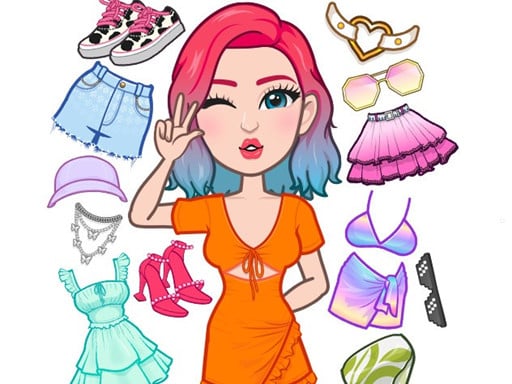
The creative loop allows you to browse decorative components, experiment with different facial features, coordinate outfits, and refine the overall styling of your character. Designed with a clean interface that responds to simple clicks or taps, the creator enables smooth experimentation across a wide range of fashion, hair, and aesthetic combinations for both boys and girls.
Your goal
The primary objective is to design custom cartoon faces and coordinate expressive character outfits that capture a desired personal style or role-play persona. Players aim to assemble harmonious visual elements—balancing facial details, hairstyles, garments, and decorative accents—to produce polished profile pictures and digital portraits ready for creative use.
How to play Avatoon Avatar Maker
1. Launch the creator and select a starting base model to begin customizing your cartoon character.
2. Browse available categories such as facial features, hairstyles, clothing, and decorative accessories.
3. Click or tap on individual items to apply them directly onto your avatar in real time.
4. Mix and match fashion pieces, makeover details, and colors until the character matches your vision.
5. Review your completed cartoon face and finalize your avatar design for use as a profile picture.
Controls and device support
Use the mouse to click or tap the screen to select items, switch categories, and customize your character.
- Controls: Mouse or touch
- Device support: Desktop + mobile
- Game frame: 504 x 800
What makes the challenge interesting
The appeal of Avatoon Avatar Maker lies in visual experimentation and aesthetic harmony. Without the distraction of health bars or restrictive timers, the player's core focus is on creative balance. Crafting an eye-catching cartoon persona requires evaluating how different elements work together—ensuring hair shapes frame the facial features naturally, clothing palettes complement skin tones, and accessories accentuate rather than clutter the portrait.
This creative loop rewards deliberate styling choices. Players can test bold contrasting styles or pursue subtle, cohesive color schemes, shifting between everyday casual looks and vibrant cartoon designs at their own pace.
Tips for Avatoon Avatar Maker
- Establish a core color palette early. Selecting two or three complementary shades for your avatar's hair, outfit, and accessories creates a unified, stylish portrait rather than a cluttered mix of clashing items.
- Focus on distinct facial expressions first. Setting eye shape, eyebrow arch, and mouth style before picking accessories ensures your character's personality remains the clear focal point of the final image.
- Avoid overcrowding the avatar with too many accessories at once. Highlighting one or two statement pieces—such as glasses or a unique hat—often yields a crisper profile picture than stacking every available item.
- Experiment with contrasting hair and background shades. High contrast between your character's silhouette and framing helps the avatar stand out clearly when scaled down to smaller display sizes.
Playing on different devices
Configured with a vertical 504 by 800 display layout, the creator adapts naturally to portrait screens on smartphones and tablets as well as desktop browser windows. On mobile devices, direct touch inputs make tapping through design options fluid, while desktop users can navigate the full wardrobe and facial catalogs with standard mouse clicks.
The skills behind the game
Avatar creation and dress-up titles offer a relaxing, highly personal branch of casual simulation gaming. In titles like Avatoon Avatar Maker, players engage with character design, fashion styling, and creative decoration without the demands of competitive scoring or fast reflexes. This format provides a welcoming creative outlet where players can casually test out different aesthetic trends, experiment with personal role-play concepts, and practice visual design in a low-stress browser environment.
Who will enjoy this game
Casual players looking for an accessible dress up game and character creator often turn to Avatoon Avatar Maker for rapid styling sessions. Because the creator requires no complex onboarding, anyone wanting to craft a cartoon face, test fashion pairings, or create a fresh profile picture can assemble complete designs in minutes. It serves as a lighthearted creative sandbox for both quick casual play and detailed visual customization.
Games with a similar feel
Love Nikki-Dress UP Queen: Like Love Nikki-Dress UP Queen, Avatoon Avatar Maker centers on fashion coordination, garment selection, and personalized styling. However, while Love Nikki features extensive narrative quests and structured wardrobe scoring battles, Avatoon Avatar Maker delivers a streamlined, sandbox avatar studio focused entirely on quick face creation and profile customization.
Project Makeover: Both Avatoon Avatar Maker and Project Makeover engage players through makeover themes and character appearance customization. The key difference lies in structure: Project Makeover links its visual transformations to puzzle progression and storyline tasks, whereas Avatoon Avatar Maker provides direct, immediate access to cartoon design tools without puzzle gating.
Frequently asked questions
What is the main goal in Avatoon Avatar Maker? The main goal is to design custom cartoon faces and style expressive characters using in-game makeover and dress-up tools for personal profiles or role-play concepts.
How do you control and customize your character? You customize your character by clicking with a mouse on desktop or tapping the screen on mobile devices to browse and apply styling options directly.
Can you design both boy and girl avatars in the game? Yes, the creator includes styling tags and customizable design options suitable for creating both boy and girl cartoon characters.
Something not right?
Tell us if the game does not load, the information is wrong or the content needs review.
Report a problem ›