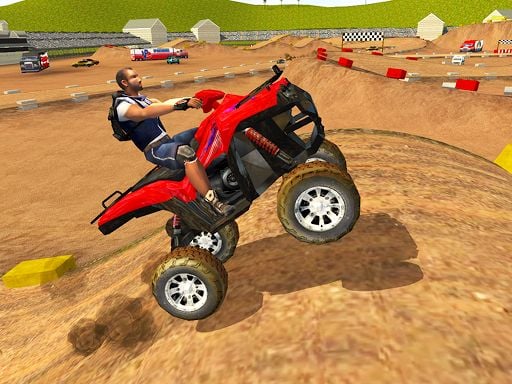
About ATV Stunts
ATV Stunts is a 3D driving simulation where players ride quad-style vehicles across an expansive open playground packed with stunt obstacles. Featuring four distinct color options to switch between, the game invites drivers of all skill levels to explore elevated tracks, high ramps, and challenging tunnels while pulling off air maneuvers.
Serving as a 3D vehicle driving simulation, ATV Stunts gives players immediate access to an extensive stunt arena designed for testing quad bike handling. The massive map includes complex architectural features such as overhead ramps, suspension bridges, subterranean tunnels, and high-altitude structures built for aerial tricks. Rather than confining drivers to linear racing tracks, the layout encourages freeform exploration across every obstacle.
Players can freely swap between four vehicle styles—green, blue, red, or yellow-red formulas—at any point during a run. The game also provides handy utilities including slow-motion playback, instant quad repairs, camera angle switches, and fast scene resets to keep the stunt session running smoothly.
Your goal
The main objective in ATV Stunts is to navigate the large stunt arena, test vehicle maneuvers on ramps and elevated pathways, and explore every feature of the map. Players aim to master high-flying tricks across complex structures while keeping their vehicle operational across diverse terrain.
How to play ATV Stunts
Get behind the handlebars and start performing tricks using these step-by-step instructions:
1. Accelerate and steer your quad across the arena using the WASD keys or directional arrow keys.
2. Cycle through the four available ATV color variants by pressing the Tab key whenever you want a fresh look.
3. Approach bridges, tunnels, and high ramps to launch your vehicle airborne and attempt stunts.
4. Switch your camera perspective with C to inspect your driving angle or view surrounding terrain.
5. Engage slow motion with T to line up delicate jumps, or press F to instantly repair damage after rough landings.
6. Use Enter to reset your ATV in place, or hit Esc/R to restart the entire scene when needed.
Controls and device support
WASD / Arrow Keys: Drive and steer vehicle
C: Change camera perspective
Tab: Switch to next ATV
Enter: Restart ATV position
R / Esc: Restart scene
T: Slow down time
- Controls: WASD + arrow keys
- Device support: Browser
- Game frame: 800 x 600
Rules to keep in mind
- Players can switch between four vehicle color themes—green, blue, red, and yellow-red—during active play.
- Vehicles that sustain damage or roll over can be restored immediately using the dedicated repair or vehicle reset inputs.
- The scene can be reset completely at any time if players wish to return to the starting layout.
What makes the challenge interesting
Gameplay in ATV Stunts emphasizes stunt experimentation and spatial navigation over rigid checkpoint racing. Navigating through mid-air pathways, wide tunnels, and steep ramps requires careful vehicle alignment and speed management. The inclusion of a slow-time mechanic allows players to inspect their trajectory mid-air or adjust steering ahead of narrow bridge approaches. Because repair and reset functions are available at a single keystroke, drivers can push vehicle limits on high structures without permanently ending their session.
Tips for ATV Stunts
- Activate slow motion (T key) right as you hit high ramps to observe your jump arc and prepare for difficult landings.
- Cycle through camera views (C key) to check clearance around narrow bridges and overhead pathways before accelerating.
- Press the repair button (F key) immediately after awkward impacts to keep your quad running at top performance without restarting.
The skills behind the game
As a title in the racing and driving category, ATV Stunts focuses on 3D vehicle physics and freeform obstacle navigation rather than structured tournament laps. Open stunt sandboxes give players room to test vehicle speeds across aerial ramps, elevated bridges, and winding tunnels.
Who will enjoy this game
Players searching for an ATV stunts game or a freeform racing game online will find a dedicated 3D stunt playground in ATV Stunts. With instant vehicle switching, custom camera views, and built-in slow-motion mechanics, it provides accessible driving action directly in modern web browsers.
Games with a similar feel
Asphalt: Like Asphalt, ATV Stunts offers fast-paced 3D vehicle action with big jumps and aerial moments, but focuses on an open trick sandbox rather than competitive arcade road races.
Need for Speed: Similar to Need for Speed, ATV Stunts centers on vehicle handling and driving dynamics, but features an open stunt arena with instant repairs and vehicle swapping instead of street-racing progression.
Frequently asked questions
How do I change vehicles in ATV Stunts? You can cycle through the four available ATV colors—green, blue, red, and yellow-red—at any time by pressing the Tab key on your keyboard.
What should I do if my quad flips or takes damage? Press F to instantly repair your ATV, or press Enter to reset your quad's position without having to reload the entire map scene.
Can I slow down gameplay to hit difficult jumps? Yes, pressing the T key triggers slow motion, helping you manage tricky jumps, bridge alignments, and stunt landings.
Something not right?
Tell us if the game does not load, the information is wrong or the content needs review.
Report a problem ›