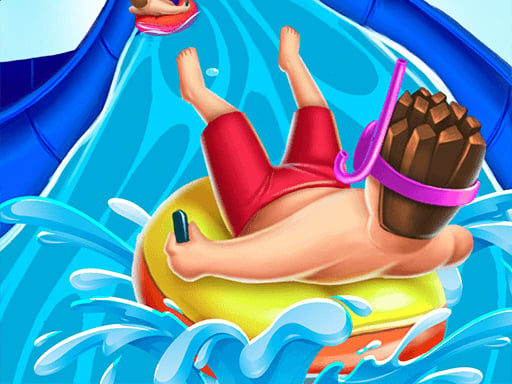
About Aquapark Shark
Aquapark Shark is a casual water park racing adventure where players guide a small character along twisting aqua slides toward the finish line. The central challenge revolves around managing your pace by balancing acceleration and braking through mouse clicks or touch inputs. By timing your speed smoothly along the course, you aim to navigate the slide run cleanly and finish with the best possible score.
Set in an energetic summer water park filled with towering flumes and splash pools, Aquapark Shark delivers an accessible slide-racing experience designed for quick play sessions. The core loop invites players to launch their character into downhill aqua tracks, using simple continuous input to maintain forward momentum and releasing it when it is time to slow down.
Each run challenges your sense of rhythm as you race toward the end of the slide. While the single-action control scheme is straightforward to pick up, completing a clean journey requires paying close attention to track layout and pacing your speed to maximize your final score across the water slide course.
Your goal
Your primary goal in Aquapark Shark is to pilot your character safely to the finish line of the water slide while aiming to achieve the highest possible score. To improve your outcomes, focus on maintaining high speed on open stretches while braking appropriately to navigate tricky sections without losing control.
How to play Aquapark Shark
1. Start the slide run and observe the immediate path ahead to anticipate curves and straightaways.
2. Hold down the left mouse button on desktop or press and hold the touchscreen on mobile to accelerate down the slide.
3. Release your mouse click or lift your finger from the screen whenever you need to brake and steady your character.
4. Maintain a steady balance between fast acceleration and controlled braking throughout the run.
5. Cross the finish line at the end of the course to secure your final run score.
Controls and device support
On PC, use the left mouse button to accelerate by clicking and holding, and release the button to brake. On mobile and tablet devices, touch and hold the screen to accelerate, then release your touch to brake.
- Controls: Mouse or touch
- Device support: Desktop + mobile
- Game frame: 800 x 600
Rules to keep in mind
- Accelerating requires an active mouse press or screen touch; letting go immediately engages the brakes.
- A run is successfully completed when your character crosses the designated finish line at the end of the water park course.
- Performance during the slide journey determines your final recorded score.
What makes the challenge interesting
The defining skill in Aquapark Shark is throttle modulation through binary input. Because acceleration and braking rely entirely on holding or releasing a single button or touch contact, success depends on timing your transitions precisely rather than steering through complex directional controls.
This creates an engaging risk-versus-reward rhythm. Holding the accelerator maximizes forward momentum for a potentially higher score, but over-committing to speed without braking at critical moments can destabilize your run. Learning when to feather the input allows you to maintain optimal speed while retaining complete control.
Tips for Aquapark Shark
- Practice feathering the accelerator with short, rhythmic taps instead of holding it down indefinitely. This prevents your character from carrying excessive speed into unexpected course transitions.
- Watch the track ahead rather than focusing solely on your character. Anticipating bends early gives you sufficient time to release the input and brake smoothly.
- Reapply acceleration as soon as your character stabilizes out of a turn to rebuild momentum quickly and keep your scoring pace high.
- Avoid panicking and holding the brake for too long, as coming to a dead stop drastically slows down your run and hurts overall performance.
Stages and progression
As you spend more time with Aquapark Shark, personal improvement comes from mastering the timing between acceleration bursts and braking points. Developing a reliable practice routine—such as focusing on smooth cornering during initial attempts before pushing for maximum downhill speed—helps build consistency across repeated runs.
Evaluating your finish results after each attempt allows you to identify sections where hesitation or over-acceleration cost you time, letting you refine your pace and push for higher personal scores on subsequent attempts.
Playing on different devices
Aquapark Shark is fully playable across both desktop browsers and mobile touch devices. On a PC, a reliable mouse switch offers crisp physical feedback when toggling between holding for acceleration and releasing to brake.
On smartphones and tablets, direct touchscreen interaction provides a comfortable, responsive experience where simple thumb taps manage your speed directly on the display.
The skills behind the game
Aquapark Shark blends the direct, accessible input style of clicker games with the forward motion of casual running and adventure titles. Rather than requiring complex multi-key inputs or precision steering, the game emphasizes timing, patience, and rhythmic interaction.
This streamlined mechanic makes it especially appealing to casual players looking for low-friction gaming sessions where immediate responsiveness and simple one-button mechanics take center stage.
Who will enjoy this game
Players searching for an entertaining aquapark shark game online will find a focused, single-button experience centered on momentum management. As a casual clicker game online, it tests quick reaction times and steady discipline without imposing steep learning curves.
Whether you have a few minutes for a quick slide run or want to practice optimizing your braking intervals for a higher score, Aquapark Shark offers an easy-to-learn water park racing challenge right in the browser.
Frequently asked questions
What is the primary objective in Aquapark Shark? The main objective is to guide your character down the water park slides to reach the finish line while earning the highest possible score through steady pacing.
How do you control your speed on the water slide? You accelerate by holding down the left mouse button on PC or touching the screen on mobile devices. Releasing the button or lifting your finger immediately activates the brakes.
Can I play Aquapark Shark on mobile devices? Yes, the game supports mobile and tablet browsers using intuitive single-touch controls to manage acceleration and braking along the course.
What skill is most important for getting a high score? Developing a consistent rhythm between pressing to accelerate and releasing to brake is essential, allowing you to carry maximum speed without losing control on turns.
Something not right?
Tell us if the game does not load, the information is wrong or the content needs review.
Report a problem ›