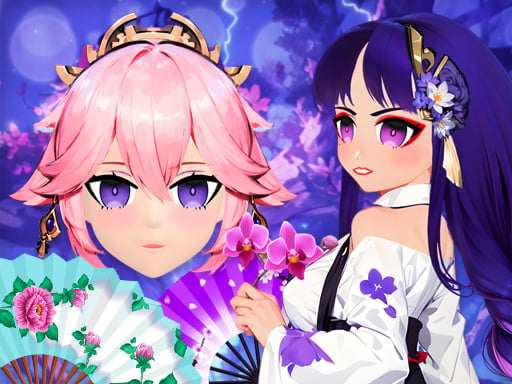
About Animegao Kigurumi DIY
Animegao Kigurumi DIY is a colorful anime dress-up game where players step into the world of Japanese-inspired cosplay and character styling. Your main activity centers on assembling distinctive outfits by choosing from an assortment of hairstyles, garments, and decorative accessories. Designed for casual creative play, it lets you experiment freely with fashion combinations to bring your favorite aesthetic visions to life.
In Animegao Kigurumi DIY, you take on the role of an anime fashion stylist. The game invites you to craft a personalized character look by browsing through different wardrobe categories, testing how distinct tops, bottoms, and accessories complement each other.
The core gameplay loop is relaxed and creative. You select items from available categories to alter your model's appearance, swapping pieces in and out until you achieve a harmonious anime-inspired ensemble. Because the focus is entirely on creative expression and aesthetic exploration, you can take all the time you need to mix bold colors, playful silhouettes, and dramatic hair designs.
Your goal
Your primary goal is to design a complete, visually appealing anime character by coordinating compatible hairstyles, clothing items, and accessories. Players aim to balance colors, patterns, and thematic accents to produce a stylish finished look that matches their personal creative taste.
How to play Animegao Kigurumi DIY
1. Launch the game in your browser and inspect the starting character model presented on screen.
2. Browse through the available styling categories to view different hairstyles, clothing options, and accessories.
3. Click or tap on a hairstyle to apply it to your model and establish the foundation of your character design.
4. Select complementary clothing pieces, testing various outfits to find a matching aesthetic.
5. Add accessories such as headwear or decorative items to finalize the overall outfit.
Controls and device support
Use a computer mouse click on desktop or a simple tap on touch screen devices to select styling options and customize your character.
- Controls: Mouse or touch
- Device support: Desktop + mobile
- Game frame: 800 x 600
What makes the challenge interesting
The primary appeal of Animegao Kigurumi DIY lies in its relaxed visual creativity and visual curation. Rather than testing reaction speed or mechanical precision, the experience emphasizes color coordination, contrast, and thematic consistency. Players explore how different hair shapes frame the character and how specific clothing pieces shift the tone from playful to elaborate. The main creative tradeoff involves balancing eye-catching statement accessories with a cohesive outfit palette so that individual design elements do not clash.
Tips for Animegao Kigurumi DIY
- Establish your hairstyle first before choosing garments. A distinct hair volume and color sets a strong tone, making it much easier to select clothing that harmonizes with your character's silhouette.
- Limit your primary color scheme to two or three matching shades. Combining too many conflicting bright hues can overwhelm the character model and create a cluttered overall appearance.
- Add accessories as subtle accents rather than piling on every available piece. Thoughtfully placed items highlight your main outfit without distracting from the overall aesthetic theme.
- Test alternative outfit combinations before settling on your final look. Swapping one piece at a time allows you to discover surprising style combinations you might otherwise overlook.
Playing on different devices
Animegao Kigurumi DIY is formatted for a native 800 by 600 display resolution and operates smoothly across multiple platforms. On desktop computers, mouse clicks provide precise navigation when selecting small fashion items. On mobile phones and tablets, the interface responds to direct touch taps, offering an intuitive and portable dress-up experience.
The skills behind the game
Animegao Kigurumi DIY fits comfortably into the casual dress-up and fashion design genres. These games offer an accessible creative outlet where players explore aesthetic concepts, visual styling, and character customization without competitive pressure.
By emphasizing anime-inspired themes alongside cute, craft-oriented styling options, the title appeals to fans of character customization who enjoy quick, lighthearted styling sessions in their web browser.
Who will enjoy this game
Players looking for an animegao kigurumi diy game or a relaxed dress up game will find an accessible styling experience focused entirely on outfit assembly. The gameplay provides a straightforward sandbox for testing anime costume concepts and exploring harmonious color combinations.
Whether you want a brief creative break or a lighthearted tool for character inspiration, the open-ended design makes it easy to experiment with different aesthetics right away without complicated setup.
Games with a similar feel
Love Nikki-Dress UP Queen: Like Love Nikki-Dress UP Queen, this game focuses on coordinating clothing, hairstyles, and accessories to create stylish fashion looks. However, while Love Nikki features extensive narrative progression and structured styling competitions, Animegao Kigurumi DIY offers a lightweight, instant browser experience centered purely on freeform anime character customization.
Frequently asked questions
What is the main goal in Animegao Kigurumi DIY? The main goal is to design a unique anime character by selecting and coordinating various hairstyles, clothing items, and accessories into a cohesive fashion outfit.
Can I play this game on mobile devices? Yes. The game supports touchscreen controls, allowing you to select wardrobe pieces and customize your character with simple finger taps on smartphones and tablets.
Are there time limits while dressing up your character? There are no documented timers or rush mechanics, allowing you to explore different fashion styles and mix-and-match pieces entirely at your own leisure.
Something not right?
Tell us if the game does not load, the information is wrong or the content needs review.
Report a problem ›