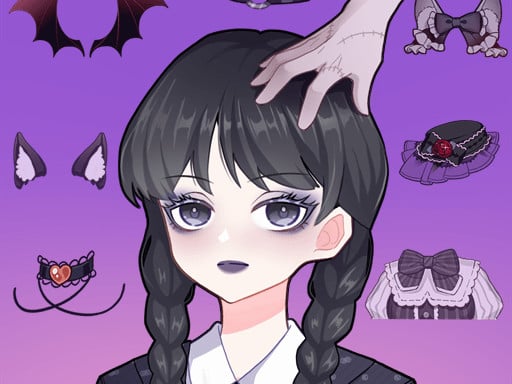
About Anime Avatar Maker
Anime Avatar Maker invites players into a creative studio space focused on designing personalized anime characters. Players adjust facial features and select from numerous decorative elements to assemble custom visual avatars directly in their browser. Built around intuitive point-and-click actions, the experience emphasizes personal aesthetic expression without time pressure, allowing you to craft and refine unique digital portraits at your own relaxed pace.
Anime Avatar Maker centers on custom character creation and styling. The experience offers detailed facial feature adjustments—often described as face pinching parts—alongside a wide selection of decorative accessories. Players can experiment with different combinations of expressions, hairstyles, and adornments to achieve the exact look they envision for their personal anime portrait.
Designed as a creative sandbox within the dress up and makeover genres, the gameplay loop revolves around browsing categories, testing different visual parts, and modifying character details until satisfied. Because the design can be altered freely, players are encouraged to explore varied aesthetics, from charming everyday appearances to imaginative character concepts, making it a flexible outlet for visual experimentation.
Your goal
The primary objective in Anime Avatar Maker is to design and fine-tune an appealing anime character avatar that matches your creative vision. You work through available customization categories to assemble facial features, adjust expressions, and apply decorative items. The creative goal focuses on visual harmony, color coordination, and finding the combination of details that best brings your imagined avatar concept to life.
How to play Anime Avatar Maker
1. Launch Anime Avatar Maker in your web browser using your mouse or touchscreen.
2. Browse the available feature menus to explore facial parts, shapes, and expressions.
3. Click or tap individual customization options to apply them to your character model.
4. Select complementary decorations, hairstyles, and accessories to complement your avatar.
5. Switch and refine visual elements freely until you are happy with the completed design.
Controls and device support
The game utilizes straightforward mouse clicks on desktop and direct tap inputs on touch devices to select menu options and apply character items.
- Controls: Mouse or touch
- Device support: Desktop + mobile
- Game frame: 504 x 800
What makes the challenge interesting
The central appeal of Anime Avatar Maker lies in creative customization and aesthetic decision-making. Rather than testing reaction speed or mechanical execution, the title challenges your eye for visual balance, color harmony, and character expression. Players weigh how different eyes, mouths, and facial contours interact with decorative pieces to communicate a distinct mood or personality.
Because elements can be swapped at any moment without penalty, the experience rewards iterative design. The key creative tradeoff involves deciding whether to build a minimalist, focused aesthetic or an intricate look layered with extensive accessories and vibrant accents.
Tips for Anime Avatar Maker
- Establish core facial features such as eyes and expression before picking accessories. Trying to style around detailed decorations early on can disrupt the overall character balance.
- Test contrasting color combinations across hair and decorative items. Sticking strictly to identical hues can make distinct character details blend together and lose visual definition.
- Cycle through multiple face adjustment options to discover subtle personality variations. Avoid settling on the first default preset so you can explore the full range of creative parts.
- Review the completed portrait as a whole after adding decorations. Stepping back helps you identify whether any single accessory overpowers the rest of the avatar.
Playing on different devices
Anime Avatar Maker is formatted in a vertical 504 by 800 display aspect ratio, making it well-suited for mobile screens as well as standard desktop browser windows. On desktop setups, navigation relies entirely on mouse clicks to browse menus and select parts. On smartphones and tablets, direct touch taps provide an equally responsive method for switching items and tweaking character aesthetics.
The skills behind the game
Anime Avatar Maker fits squarely into the casual dress up, makeover, and simulation genres designed for creative play. These titles prioritize self-expression, visual experimentation, and customizable aesthetics over competition or reflexes. By offering modular facial components, cute decorative accessories, and cartoon styling, the game provides a welcoming, low-stress environment where players of all ages can explore character styling and visual design.
Who will enjoy this game
Players looking for an anime avatar maker game or a relaxed dress up game often seek accessible character editors that require no installation. Anime Avatar Maker serves this interest directly by delivering quick, browser-based character generation. It works well as a casual creative break for digital art enthusiasts, anime fans wanting to prototype profile pictures, or anyone looking to enjoy lighthearted styling practice.
Games with a similar feel
Love Nikki-Dress UP Queen: Like Love Nikki-Dress UP Queen, Anime Avatar Maker shares a strong focus on fashion styling, aesthetic coordination, and character decoration. However, while Love Nikki incorporates extensive story progression and themed wardrobe challenges, Anime Avatar Maker delivers a streamlined, instant-access avatar creation sandbox focused on facial features and personal portraits without competitive scoring.
Project Makeover: Both Anime Avatar Maker and Project Makeover center on visual transformation and makeover themes. The major difference is structure: Project Makeover links appearance makeovers to puzzle-solving mechanics and narrative episodes, whereas Anime Avatar Maker offers pure, standalone character customization that players can tweak freely at any time directly in their browser.
Frequently asked questions
What is Anime Avatar Maker? Anime Avatar Maker is a casual browser-based creative game where players design custom anime character avatars by selecting facial features, expressions, and decorative accessories.
Can you change avatar parts after choosing them? Yes, avatar features and decorations can be switched at will, allowing you to freely experiment with different aesthetic combinations throughout your session.
How do you control the game on desktop and mobile? You can play using mouse clicks on a computer or touch taps on mobile screens to navigate customization menus and apply items to your avatar.
Something not right?
Tell us if the game does not load, the information is wrong or the content needs review.
Report a problem ›