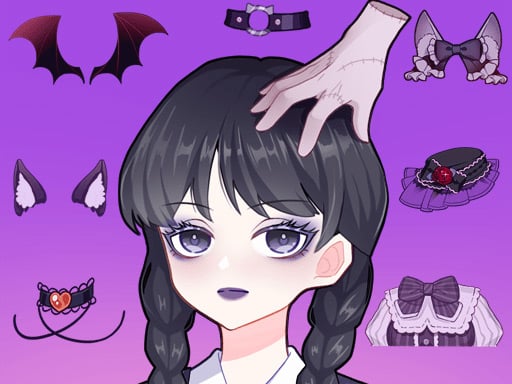
About Anime Avatar Creator
Anime Avatar Creator is a relaxing dress up and character design game where you assemble custom illustrated portraits. Players can personalize their anime avatars by combining a wide selection of makeup styles, fashionable clothes, decorative accessories, special effects, and themed backgrounds. Designed as a creative digital styling experience, it lets you experiment with distinctive visual aesthetics directly in your web browser.
In Anime Avatar Creator, the core activity centers on building original anime-styled character illustrations from a curated wardrobe and cosmetic inventory. You start with a base figure and browse through multiple customization categories, selecting hairstyles, facial features, makeup accents, and garments to establish a unique fashion identity.
Beyond basic wardrobe choices, the game provides options to layer accessories, apply atmospheric special effects, and select coordinating background scenes to complete the presentation. The intuitive point-and-click or tap interface allows you to freely swap items, test contrasting color palettes, and refine your character concept at a calm, self-directed pace.
Your goal
The primary objective is to design a cohesive anime avatar that reflects your personal creative vision or a specific aesthetic theme. Because the game emphasizes artistic expression rather than competitive scoring, success comes from harmonizing facial makeup, clothing pieces, accessories, special effects, and backdrops into a visually balanced final portrait.
How to play Anime Avatar Creator
1. Launch the game on your desktop browser or mobile screen to open the avatar creation studio.
2. Browse through the customization tabs to choose facial features, expressions, and makeup options.
3. Select complementary clothing pieces from the wardrobe categories to establish an outfit style.
4. Add decorative accessories such as jewelry, headwear, or handheld items to refine the character details.
5. Pick a thematic background and apply visual special effects to finalize your finished anime portrait.
Controls and device support
Use the left mouse button to click on wardrobe categories and select items, or tap menu icons and assets directly on touch-enabled screens.
- Controls: Mouse or touch
- Device support: Desktop + mobile
- Game frame: 504 x 800
What makes the challenge interesting
Anime Avatar Creator focuses on visual balance, color coordination, and creative composition. Rather than testing dexterity or quick reflexes, the experience challenges players to curate compatible design elements from distinct item pools. Choosing the right interplay between subtle makeup, dramatic clothing silhouettes, and vibrant backdrops requires an eye for artistic detail.
A key styling tradeoff involves deciding between a bold, high-contrast look and a minimalist, unified color scheme. Overloading an avatar with competing special effects and intricate accessories can obscure character outlines, while carefully matching secondary accent colors creates a polished, striking presentation.
Tips for Anime Avatar Creator
- Establish a foundational makeup and facial tone before picking garments. This ensures your cosmetic choices complement the overall color scheme rather than clashing with clothing hues.
- Select background scenery that contrasts with your avatar's primary outfit color. A distinct backdrop prevents the character silhouette from blending into the environment.
- Apply visual special effects sparingly toward the end of your styling session. Overusing intense effects can distract from fine outfit details and jewelry accents.
- Test several accessory combinations within the same theme to build a cohesive persona, avoiding random pieces that break visual harmony.
Playing on different devices
Built in HTML5 with a portrait canvas of 504 by 800 pixels, Anime Avatar Creator adapts smoothly across mobile devices and desktop web browsers. On desktop setups, standard mouse clicks offer precise targeting for small accessory icons. On smartphones and tablets, direct touch taps allow for convenient on-the-go styling in vertical orientation without requiring additional downloads.
The skills behind the game
Falling within the digital fashion and dress up space, Anime Avatar Creator appeals to players who enjoy illustration, character customization, and casual creative expression. The genre provides a low-pressure environment where aesthetic experimentation replaces competitive timers or skill checks, making it suitable for casual styling sessions across all ages.
Who will enjoy this game
Players looking for an anime avatar creator or a creative dress up game typically seek intuitive tools to visualize original characters or conceptualize animated personas. Engaging with versatile wardrobe options, cosmetics, and scenic backdrops offers a relaxing creative outlet to practice visual styling, explore anime art aesthetics, and test unique fashion combinations directly in the browser.
Games with a similar feel
Love Nikki-Dress UP Queen: Like Love Nikki-Dress UP Queen, this game focuses on the enjoyment of coordinating garments and accessorizing stylized characters. However, while Love Nikki features a complex wardrobe ecosystem with thematic styling evaluations, Anime Avatar Creator offers a lightweight, browser-accessible avatar canvas dedicated entirely to casual, freeform creative design.
Project Makeover: Similar to Project Makeover, Anime Avatar Creator highlights the transformation of character appearance through makeup, facial styling, and curated outfits. The key distinction is that Anime Avatar Creator centers purely on direct anime portrait customization without puzzle-solving layers, appealing to players seeking an unhurried digital art studio.
Frequently asked questions
What is Anime Avatar Creator? Anime Avatar Creator is a browser-based dress up and character design game where players create custom anime-style portraits using a wide variety of clothing, makeup, accessories, backgrounds, and special effects.
How do you control the styling options in the game? You can navigate all wardrobe tabs, makeup palettes, and background selectors by clicking with a computer mouse or tapping options on a touchscreen mobile device.
Can I customize the scene behind the character? Yes. The game includes selectable background settings and special visual effects that can be adjusted to match your character's outfit and artistic concept.
Something not right?
Tell us if the game does not load, the information is wrong or the content needs review.
Report a problem ›