About Animals Skin
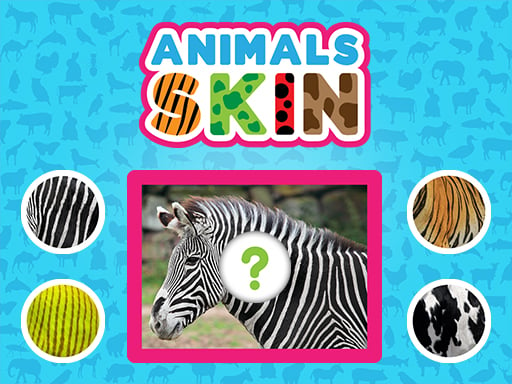
Animals Skin is an educational puzzle game designed for young players to explore nature by identifying distinct animal coats. Each puzzle presents an animal illustration missing a section of its coat alongside candidate skin and fur swatches. Players inspect visual patterns, colors, and textures, then drag the matching piece onto the animal illustration to complete the vibrant picture.
Animals Skin offers an interactive visual matching exercise where players learn to recognize diverse animal textures, furs, and surface patterns. Developed by Nau.kids, the game presents clean, colorful animal artwork with empty sections that need restoration. By studying the surrounding animal anatomy, players determine which piece belongs to which creature, connecting real-world animal characteristics with digital puzzle solving.
The core gameplay loop centers on observation and manual precision. A player surveys the active animal image, evaluates the available texture swatches, and drags the correct piece directly into place. Completing an illustration provides immediate visual satisfaction, encouraging young learners to continue exploring different animals across the animal kingdom at their own pace.
Your goal
The primary objective in Animals Skin is to accurately identify and place the missing skin, fur, or pattern swatch onto each animal image. Players aim to complete each colorful illustration without unnecessary misplacements, strengthening pattern recognition, texture awareness, and fine motor coordination while discovering how various creatures look in nature.
How to play Animals Skin
1. Look closely at the featured animal on the screen and examine the missing section of its body.
2. Review the available skin and fur swatches displayed around the play area.
3. Compare pattern traits such as spots, stripes, scales, and fur color against the animal illustration.
4. Click or touch the matching piece, then drag it toward the empty slot on the animal.
5. Release the piece over the designated target area to complete the vibrant picture.
Controls and device support
Drag the correct skin piece to the animal to complete the image using a mouse on desktop or touch gestures on mobile and tablet screens.
- Controls: See in-game controls
- Device support: Desktop + mobile
- Game frame: 800 x 450
Rules to keep in mind
- A skin piece must correspond to the correct animal to successfully complete the picture.
- Players complete puzzles by dragging the chosen texture swatch directly onto the animal illustration.
What makes the challenge interesting
Animals Skin emphasizes observational learning, visual comparison, and direct tactile interaction. The central challenge requires players to distinguish subtle visual differences between textures, such as differentiating leopard spots from tiger stripes or rough reptilian scales from soft mammalian fur. Rather than relying on rapid reflexes or timer pressure, the experience rewards deliberate attention to detail and logical deduction.
The core tradeoff involves taking time to examine visual cues versus guessing quickly based on color alone. Taking a brief moment to analyze texture direction and grain prevents mistaken placements and reinforces genuine biological pattern recognition.
Tips for Animals Skin
- Examine the edges of the missing section before selecting a swatch. Matching edge colors and line continuations helps identify the correct piece quickly without random guessing.
- Distinguish between similar color palettes by focusing on texture patterns. Animals may share brownish tones, but one might feature thick fur while another displays fine scales.
- Encourage young learners to name the animal aloud before dragging the piece. Connecting the creature's identity with its natural coat reinforces learning retention.
- Maintain a smooth drag gesture to ensure the piece aligns cleanly over the target area, avoiding accidental drops short of the destination.
Stages and progression
As players work through the vibrant animal images, puzzles present a broader variety of textures and animal classes. While individual completion criteria remain consistent, developing a steady routine of inspecting each animal's features before grabbing a swatch helps players build confidence and visual mastery across different puzzle sets.
Playing on different devices
Animals Skin is built in HTML5 with an 800 x 450 canvas, ensuring responsive play across desktop computers, tablets, and smartphones. On desktop setups, a standard mouse allows precise click-and-drag movements. On mobile and tablet devices, direct touch controls provide an intuitive experience for young children dragging swatches directly with their fingers.
The skills behind the game
Within the puzzle and educational genre, Animals Skin belongs to the category of shape and texture completion games. Rather than relying on abstract geometry or numerical sequences, these puzzles anchor their problem-solving in tangible real-world concepts. Matching biological features such as animal skins encourages deductive reasoning and observational discipline, making logic puzzles accessible and engaging for early learners.
Who will enjoy this game
Players looking for an engaging puzzle game online that combines casual mechanics with educational value will find Animals Skin easy to pick up. The animals skin game format provides short, self-contained matching challenges suitable for classroom practice, home learning, or relaxed casual play across any standard web browser.
Frequently asked questions
What is the main goal in Animals Skin? The main goal is to complete each animal illustration by dragging the correct missing fur, skin, or pattern swatch onto the animal.
What devices support Animals Skin? Animals Skin is playable directly in modern web browsers on mobile phones, tablets, and desktop computers through touch or mouse controls.
Who is this puzzle game designed for? The game is designed primarily as an educational learning activity for young children, helping them develop visual logic and learn about animal coats.
Something not right?
Tell us if the game does not load, the information is wrong or the content needs review.
Report a problem ›