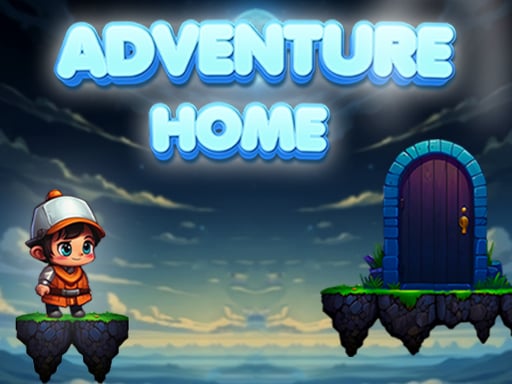
About Adventure Home
Adventure Home is a 2D side-scrolling platformer where players run, leap across terrain, and gather treasures across themed adventure stages. Designed with lightweight performance and accessible movement in mind, the game challenges you to navigate obstacles, explore pathways, and complete quests using simple direction and jump controls on desktop or mobile touchscreens.
Adventure Home presents a colorful 2D platforming experience centered on navigating courses filled with gaps, platforms, and collectibles. Players take charge of a runner exploring vibrant outdoor layouts, balancing forward momentum with careful jump timing to clear hazards safely. The core gameplay loop focuses on traversing each route from start to finish while actively hunting for scattered treasure items.
The title incorporates quest objectives that guide your journey, encouraging thorough exploration rather than mindless sprinting. Because the presentation utilizes a clean graphical layout within an efficient visual package, the action remains readable across various screen sizes. Whether moving across flat ground or leaping toward elevated ledges, maintaining steady control allows you to discover rewards across every stretch of the map.
Your goal
The primary objective in Adventure Home is to guide your character through each course, completing active quests and collecting available treasures along the path. Players aim to refine their movement precision, timing leaps cleanly over gaps while tracking down valuable items to achieve complete stage runs without taking unnecessary risks.
How to play Adventure Home
1. Launch the game and observe the starting layout to identify your initial route and platform heights.
2. Move left or right along the terrain using the directional controls or on-screen touch buttons.
3. Press the jump command to clear hazards, hop over ground obstacles, and reach elevated structures.
4. Seek out and collect treasures distributed across the upper and lower platform routes.
5. Fulfill stage quests and advance forward toward the end of the course to complete your run.
Controls and device support
On PC, use Left Arrow to move left, Right Arrow to move right, and Up Arrow to jump. On mobile or touch devices, use the dedicated on-screen touch buttons to steer and jump.
- Controls: Keyboard
- Device support: Desktop + mobile
- Game frame: 480 x 270
Rules to keep in mind
- Movement is governed by horizontal direction inputs and vertical jump inputs.
- Players collect treasures placed throughout the 2D platforming levels during their run.
- Progress through the game involves taking on and completing quest goals across stages.
What makes the challenge interesting
The central appeal of Adventure Home lies in its approachable 2D platforming rhythm, where spatial awareness and deliberate movement outweigh complex button combinations. With streamlined controls consisting solely of movement and jumping, the skill barrier centers on judging distances accurately and executing leaps at the ledge edge. Rushing forward can lead to misjudged gaps or bypassed collectibles, creating a natural gameplay tradeoff between quick completion and thorough treasure gathering.
Tips for Adventure Home
- Time leaps from the edge of platforms rather than jumping early. Launching too soon can cause your character to fall short of distant ledges and miss high-altitude treasures.
- Check both upper and lower pathways as you explore each section. Rushing straight along the bottom floor often causes players to overlook valuable items positioned on higher perches.
- Come to a brief stop before attempting challenging jumps. Gaining composure reduces input slips and prevents overshooting narrow landing zones.
- Align your movement with active quest objectives rather than sprinting blindly toward the finish line, ensuring you satisfy stage goals on your initial attempt.
Stages and progression
Progression in Adventure Home unfolds through a series of quest-driven platforming challenges. As you traverse different areas, your route requires adapting to varied obstacle arrangements and discovering treasures across multiple elevations. To build proficiency across your playthrough, aim to develop a consistent rhythm between running and leaping, learning the reach of your jump to handle progressively wider platform spans.
Playing on different devices
Adventure Home supports both desktop and touchscreen play with dedicated control schemes. On PC, keyboard navigation is mapped directly to the arrow keys, offering tactile feedback for quick directional adjustments and jumps. On Android and other mobile setups, the game displays on-screen touch buttons, allowing comfortable handheld play without requiring external hardware.
The skills behind the game
Within casual and hypercasual gaming, 2D platformers emphasize immediate pick-up-and-play accessibility over intricate control schemes. Adventure Home exemplifies this design approach by pairing classic side-scrolling traversal with straightforward quest objectives. By focusing on fundamental movement skills like jump timing and obstacle clearance, the game provides an engaging experience for players seeking relaxing platforming action without steep learning curves.
Who will enjoy this game
Players looking for an engaging adventure home game often seek lighthearted side-scrollers that blend running, jumping, and item collection. Adventure Home caters directly to this interest, offering bite-sized platforming challenges suitable for short practice breaks or casual desktop and mobile play. The clear focus on directional navigation and treasure hunting makes it an inviting option for anyone exploring casual browser adventures.
Frequently asked questions
What is the main goal in Adventure Home? The main goal is to guide your character through 2D obstacle courses, leaping across platforms, completing quest tasks, and gathering collectible treasures along your route.
How do you control your character on PC and mobile? On desktop computers, use the Left and Right Arrow keys to run and the Up Arrow key to jump. On mobile devices, tap the corresponding on-screen touch buttons.
Does Adventure Home require complex button combos? No, the title is designed with super simple controls focusing entirely on horizontal movement and jumping, making it accessible for quick casual gaming sessions.
Something not right?
Tell us if the game does not load, the information is wrong or the content needs review.
Report a problem ›