About Advanced Green Clicker Game
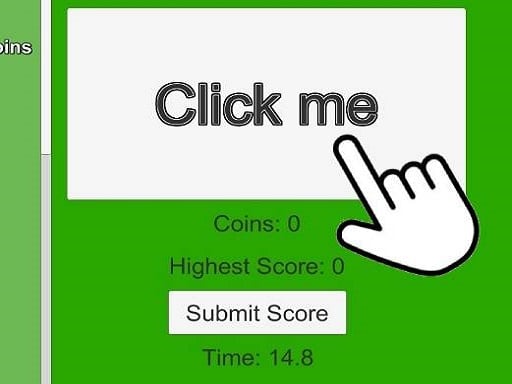
Advanced Green Clicker Game is a straightforward tapping title where your primary task is clicking to earn coins and building a competitive score. The game prompts you to register your name the first time you play so you can submit your personal record. With a built-in leaderboard that players can refresh at any point, the experience focuses on steady clicking endurance and competing for the top rank.
In Advanced Green Clicker Game, the core gameplay loop revolves around repeated clicks to accumulate in-game coins and raise your total score. The title keeps the presentation accessible and direct, letting you jump straight into the action without complex setup menus or lengthy tutorials.
When you begin your first session, you enter your player name, which is recorded for your submitted scores. As you continue clicking, you can track your standing against other participants by checking the leaderboard. The interface allows you to view and refresh the rankings whenever you want to see if your latest tapping session has pushed you closer to the number one spot.
Your goal
The main goal is to generate as many coins as possible through consistent clicking and submit your highest possible score to the public standings. Players strive to improve their personal coin counts and challenge others to reach the top position on the refreshed leaderboard.
How to play Advanced Green Clicker Game
1. Launch the game and enter your preferred player name when prompted during your initial session.
2. Click or tap the active screen area repeatedly to begin earning coins.
3. Keep tapping at a steady pace to build up your overall score tally.
4. Submit your current high score to register your performance in the system.
5. Open and refresh the leaderboard to inspect current competitor scores and verify your rank.
Controls and device support
The game operates entirely via mouse click on desktop or screen tap on touch devices.
- Controls: Mouse or touch
- Device support: Desktop + mobile
- Game frame: 800 x 600
Rules to keep in mind
- Name entry is requested only the first time you play the game.
- Each valid click or tap generates coins that contribute toward your submitted high score.
- High scores must be submitted to appear in the community rankings.
- The leaderboard can be refreshed by the player to display updated competitive standings.
What makes the challenge interesting
The appeal of Advanced Green Clicker Game lies in pure physical rhythm and pacing. Because the loop centers directly on tapping to gather currency and submit records, success depends heavily on comfortable hand positioning and sustaining a fast, fatigue-free clicking rate. Players who enjoy simple endurance challenges will appreciate the immediate feedback loop.
A key strategic consideration is managing your physical stamina over extended play sessions. Sprinting with maximum finger speed might yield quick initial coins, but pacing yourself evenly often prevents hand strain when aiming for substantial leaderboard totals.
Tips for Advanced Green Clicker Game
- Establish a consistent clicking cadence rather than tensing up your hand. A steady rhythm prevents early fatigue and helps maintain continuous coin generation across longer scoring attempts.
- Remember to submit your score after completing an intensive tapping burst. Forgetting to submit means your newly collected coins will not reflect on the active leaderboard.
- Refresh the rankings frequently between sessions. Checking updated positions lets you gauge exactly how many additional coins you need to overtake nearby rivals on the board.
- Switch fingers or hand positions periodically during prolonged play. Alternating fingers prevents localized muscle stiffness while keeping your input stream steady.
Stages and progression
Progression in this title is measured directly by your accumulating coin total and your climb up the player leaderboard. Rather than moving through pre-scripted stages or narrative chapters, you advance by setting higher personal records and defending your rank against other competitors.
To structure your progression effectively, try setting incremental coin benchmarks for each session. Comparing your submitted scores before and after refreshing the standings provides a clear roadmap for gradual improvement.
Playing on different devices
The game runs within a standard 800 by 600 display resolution and accepts both mouse clicks on desktop setups and touch taps on mobile screens. Desktop players may benefit from using a responsive mouse with light switch activation, while touch users can rest their device on a flat surface to tap comfortably with either hand.
The skills behind the game
Belonging to the hypercasual clicker genre, this game emphasizes instant accessibility, minimal barrier to entry, and rapid gratification. Players who enjoy clicker titles typically look for quick sessions where every interaction immediately increases a visible score counter.
By paring down the mechanics to direct clicking, coin collection, and competitive leaderboard tracking, the game delivers an unencumbered test of finger speed and stamina suited for quick casual breaks.
Who will enjoy this game
Players looking for an advanced green clicker game generally seek a focused tapping environment where they can test their clicking speed and see their efforts reflected on a public high score chart. It serves as an easy-to-learn practice tool for building hand-eye rhythm and endurance.
Because the game requires no complex registration beyond entering a name on initial launch, it provides an ideal short-session distraction for players who enjoy chasing leaderboard ranks and beating personal coin milestones.
Games with a similar feel
Cookie Clicker: Like Cookie Clicker, this title centers on repetitive clicking to accumulate a primary currency and drive numbers higher. However, while Cookie Clicker emphasizes extensive production buildings and incremental idle systems, Advanced Green Clicker Game prioritizes direct manual tapping, score submissions, and public leaderboard competition.
Frequently asked questions
How do I register my name on the leaderboard? You are prompted to enter your display name the first time you launch and play the game. That saved name is then tied to the high scores you submit.
Can I check my current rank while playing? Yes. The game features a built-in leaderboard view that you can manually refresh to inspect current positions and see how your score compares to others.
What inputs are supported for earning coins? You can play using standard mouse clicks on a computer or direct screen taps on a touchscreen device, with each click contributing toward your score.
Something not right?
Tell us if the game does not load, the information is wrong or the content needs review.
Report a problem ›