About 4GameGround - Minecraft Coloring
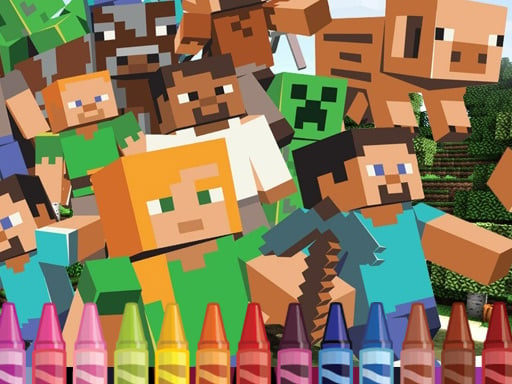
4GameGround - Minecraft Coloring is a casual creative game where players can paint scenes and characters themed around the blocky world of Minecraft. Suitable for players of all ages, it invites kids and fans to freely experiment with colors across heroes and locations using simple tap or mouse interactions directly in their browser.
4GameGround - Minecraft Coloring provides an accessible digital canvas for drawing and coloring enthusiasts. All included artwork templates are dedicated to characters and recognizable scenery from Minecraft, giving fans a familiar universe to customize. Whether recreating authentic hero appearances or inventing entirely fresh palettes for surrounding environments, the game encourages artistic expression without messy cleanups. Players of any age can jump in right away to practice their creative skills.
Built as an HTML5 title with a 960 x 540 display format, the game runs smoothly across both desktop and mobile platforms. It delivers an intuitive, relaxed painting environment that lets young artists explore color combinations at their own comfortable pace.
Your goal
The main objective in 4GameGround - Minecraft Coloring is to complete coloring pages featuring heroes and locations from the Minecraft universe. Players aim to express their creativity by choosing shades and filling in the line art, experimenting with various visual styles until each block-themed picture is colored to their personal satisfaction.
How to play 4GameGround - Minecraft Coloring
1. Launch the game in your desktop or mobile web browser.
2. Select an available coloring page featuring a Minecraft hero or location.
3. Choose a color from the available palette for your brush.
4. Use your mouse or tap the screen to apply the chosen color to the drawing.
5. Experiment with different colors across the hero and background elements until your picture is finished.
Controls and device support
Left Mouse Button: Select color and apply paint to the drawing area
Touch Screen Tap: Select color and apply paint to the drawing area
- Controls: Mouse or touch
- Device support: Desktop + mobile
- Game frame: 960 x 540
What makes the challenge interesting
Gameplay focuses on relaxed, open-ended creativity rather than strict challenges or time constraints. Because the drawings center specifically on heroes and settings inspired by Minecraft, players have full freedom to recreate classic looks or experiment with unexpected color combinations. There are no fail states or penalties, making it an inviting experience for children practicing motor skills and artistic design. The entire loop is driven by the simple pleasure of filling in digital line art using straightforward mouse clicks or screen taps.
Tips for 4GameGround - Minecraft Coloring
- Decide on a primary color palette for the main hero first to create a balanced contrast against the background elements.
- Feel free to experiment with bold, unusual colors, as the open-ended format lets you reimagine familiar block-world scenes without restrictions.
- When playing on a mobile touchscreen, tap carefully within segmented outlines to ensure your chosen color fills the exact intended area.
The skills behind the game
Categorized under Arcade and Coloring, 4GameGround - Minecraft Coloring blends simple browser accessibility with casual art creation. Arcade coloring titles offer peaceful, low-stress gameplay requiring no complex button combos or quick reflexes, making them an approachable entry point for young gamers and a relaxing pastime for creative players of any age.
Who will enjoy this game
Players looking for a 4gameground - minecraft coloring game or a casual coloring game online can easily explore themed digital canvases here. Functioning as a lightweight arcade game online, it gives fans a zero-install, browser-friendly way to interact with block-world imagery on both desktop and mobile devices.
Games with a similar feel
Minecraft: While Minecraft focuses on exploration, survival, and three-dimensional block construction in an open world, 4GameGround - Minecraft Coloring borrows its iconic visual style for a peaceful, 2D digital coloring activity.
Happy Color: Happy Color emphasizes structured color-by-number mechanics across diverse photography and art categories, whereas 4GameGround - Minecraft Coloring offers unnumbered, freeform color experimentation centered strictly on Minecraft-themed templates.
Frequently asked questions
What controls are used to play 4GameGround - Minecraft Coloring? Players can use a mouse on desktop computers or tap the screen on mobile devices to select colors and paint the pictures.
Are there age restrictions or time limits in this game? No, players of any age can join at any time. There are no timers or scoring pressures, allowing for a completely relaxed creative experience.
What themes are featured in the drawings? All coloring templates in the game are dedicated to characters, heroes, and scenic locations inspired by the Minecraft game.
Something not right?
Tell us if the game does not load, the information is wrong or the content needs review.
Report a problem ›