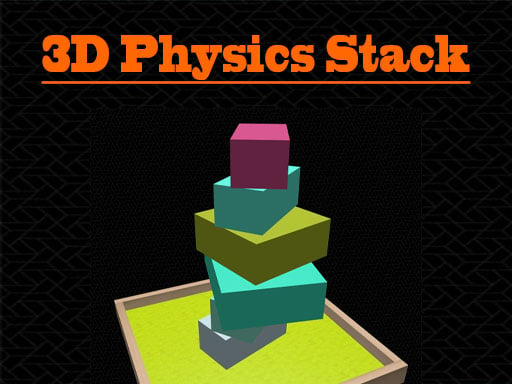
About 3D Physics Stack
3D Physics Stack is an engaging 3D physics and educational puzzle game where players carefully build towering structures. By positioning blocks accurately from left to right, you must create the highest stack possible without letting the pieces tumble. Test your spatial reasoning, balance physics, and attempt to surpass your previous best score and survival playing time in every session.
In 3D Physics Stack, players enter a casual puzzle environment centered on balance, geometry, and structural stability. The main objective is straightforward yet challenging: arrange blocks neatly on top of one another to achieve maximum vertical height. Because the game incorporates 3D physics dynamics, even minor misalignments can make your growing tower unstable.
Players have the ability to shift each block horizontally to the left or right to find optimal alignment before placing it. As the stack grows taller, maintaining center-of-gravity balance becomes increasingly vital. The game tracks both your achieved score and total playing time, challenging you to constantly refine your placement technique and beat your personal records.
Your goal
The main goal in 3D Physics Stack is to construct the highest vertical tower possible by stacking blocks securely on top of each other. Players must carefully adjust horizontal block positions to maintain equilibrium, prevent structural collapse under 3D physics, and continually strive to beat their own personal best score and survival playing time.
How to play 3D Physics Stack
1. Start the game by clicking or tapping the screen to begin your stacking attempt.
2. Observe the incoming block and assess the current foundation of your tower.
3. Move the block left and right to align it with the pieces beneath.
4. Release or set the block carefully to ensure the stack remains balanced.
5. Continue building higher while trying to beat your best score and playing time.
Controls and device support
Click: Move block and interact with the game
Touch: Move block and interact with the game
- Controls: Mouse or touch
- Device support: Desktop + mobile
- Game frame: 800 x 600
Rules to keep in mind
- Blocks must be placed on top of one another to build the stack upward.
- Blocks can be adjusted horizontally left and right prior to placement.
- The game evaluates structural stability using 3D physics simulation to determine overall height.
What makes the challenge interesting
Gameplay in 3D Physics Stack revolves around precision, spatial perception, and patience. Because the game simulates 3D physics, each block's weight and alignment directly impact the stability of the entire structure beneath it. A poorly centered placement can cause wobble, shifting the center of mass and increasing the likelihood of a collapse. Players must balance speed with steady horizontal adjustments, making sure each layer provides a reliable base for subsequent blocks while striving to beat past score and time benchmarks.
Tips for 3D Physics Stack
- Center each incoming block as closely as possible over the base below to maintain structural stability and prevent tilting under 3D physics.
- Take time to adjust horizontal positions carefully before confirming placement, as uneven overhangs significantly increase the risk of tower collapse.
- Monitor your overall tower balance continuously rather than focusing solely on the top piece to safely extend your survival playing time.
The skills behind the game
Categorized under puzzles and hypercasual mind games, 3D Physics Stack blends physical simulation with accessible mechanics. Physics puzzle games challenge players to understand gravity, momentum, and equilibrium through hands-on interaction. This title delivers an educational yet entertaining experience suitable for kids and casual players who enjoy testing their spatial judgment and mechanical problem-solving in a lightweight browser setting.
Who will enjoy this game
As an engaging puzzle game online, 3D Physics Stack offers straightforward block-building mechanics directly in your web browser. Players searching for a 3d physics stack game will appreciate the clear emphasis on balance, real-time adjustments, and high-score chasing. Its intuitive controls and 3D visual presentation make it an accessible physics challenge for all ages.
Frequently asked questions
What is the main objective in 3D Physics Stack? The goal is to stack blocks on top of each other to build the highest tower possible while balancing 3D physics to beat your high score and playing time.
How do you control the placement of blocks? You can move each block left and right using click or touch controls to align it accurately with the rest of the stack before placing it.
Is 3D Physics Stack suitable for younger players? Yes, the game is designed as an educational and hypercasual mind puzzle suitable for kids and players of all ages who enjoy physics-based stacking challenges.
Something not right?
Tell us if the game does not load, the information is wrong or the content needs review.
Report a problem ›