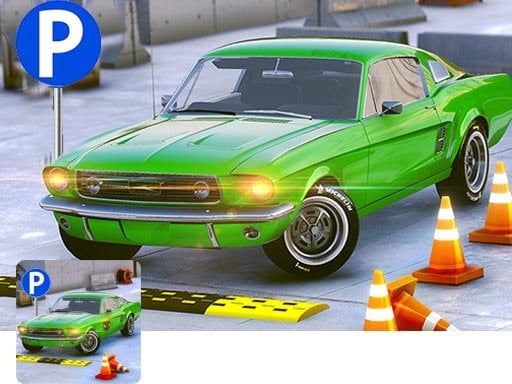
About 3d car parking
3d car parking is a 3D driving and parking simulation game where players test their steering precision across challenging urban courses. Your core task is to guide vehicles safely past road barriers, avoid collisions, and smoothly maneuver into designated parking spots across daytime and nighttime city environments.
In 3d car parking, precision navigation takes center stage as you maneuver through detailed city courses designed to challenge both casual drivers and seasoned simulation enthusiasts. The game emphasizes realistic vehicle handling with features like first-person perspective views, rear-view mirrors, gear shifting, proximity sensors, turn signals, traffic lights, and responsive engine audio. Players must carefully negotiate tight turns and road obstacles without bumping or scratching their vehicles. With multiple modes including parking practice, license qualification, and city driving, the experience delivers diverse driving scenarios across day and night settings with an extensive lineup of unlockable cars, jeeps, vans, and emergency vehicles.
Your goal
The primary objective in 3d car parking is to steer your vehicle through obstacle-lined courses and successfully park inside the assigned parking lot without bumping or scratching your car. Completing parking tasks allows you to progress through hundreds of unique levels, earn driver licenses, and unlock a diverse fleet of specialized vehicles while maintaining clean runs.
How to play 3d car parking
1. Observe the course layout and identify the location of your assigned parking lot before accelerating.
2. Use your keyboard to steer the car along the road, following traffic flow and signals.
3. Check your rear-view mirrors and proximity sensors to gauge distances from barriers and obstacles.
4. Align the vehicle squarely within the marked parking bay boundaries to complete the parking task cleanly.
Controls and device support
The game is configured for keyboard controls to steer and handle the vehicle through each parking course.
- Controls: See in-game controls
- Device support: Browser
- Game frame: 800 x 600
Rules to keep in mind
- Avoid collisions with road barriers, curbs, and objects; bumping or scratching your vehicle jeopardizes your run.
- You must park accurately within the designated parking lot area to successfully finish the level.
- Follow designated traffic lights and signals while navigating through city driving routes.
What makes the challenge interesting
Gameplay in 3d car parking centers on patience, spatial awareness, and fine throttle control rather than raw speed. Maneuvering large vehicles like buses, vans, and emergency trucks demands wider turning arcs and careful mirror checks compared to compact sport cars. First-person perspective adds an authentic cockpit viewpoint where proximity sensors and gearbox shifting dictate how smoothly you ease into tight spaces. Success requires anticipating tight corners and adjusting your trajectory well before entering the designated parking slot.
Tips for 3d car parking
- Rely on proximity sensors and rear-view mirrors when reversing or slotting into tight bays to prevent accidental vehicle contact.
- Reduce your driving speed ahead of sharp turns to give yourself ample time to adjust steering angles around roadside barriers.
- Practice in the parking practice mode to familiarize yourself with different vehicle dimensions and handling traits before attempting license tests.
Stages and progression
3d car parking features a multi-tiered progression system spanning 200 unique levels across day and night city maps. Players advance through dedicated parking practice, license testing, and city driving modes, unlocking an assortment of classic cars, sports cars, jeeps, vans, buses, ambulances, and police cruisers as they clear stages.
Playing on different devices
Configured for desktop browser play at 800 x 600 resolution, the game utilizes keyboard input for steering and vehicle control across all challenges.
The skills behind the game
Categorized under hypercasual and arcade driving experiences, 3d car parking strips complex racing formats down to the pure mechanical challenge of spatial navigation and precision positioning. While traditional car titles emphasize high-speed competition, hypercasual parking games engage players through quick, accessible stages focusing on obstacle evasion, vehicle control, and satisfying completion of tight parking maneuvers.
Who will enjoy this game
Players searching for a 3d car parking game or general car parking game titles look for immersive driving simulations with realistic navigation challenges. The title fulfills these expectations by pairing detailed 3D graphic perspectives, cockpit instruments, and obstacle-laden city courses with structured progression and parking challenges tailored for single-player browser gaming.
Games with a similar feel
Car Parking Multiplayer: Like Car Parking Multiplayer, 3d car parking emphasizes vehicle maneuvering, parking bays, and careful spatial control. However, 3d car parking delivers a single-player structured browser campaign with 200 levels and license modes rather than an expansive open-world multiplayer sandbox.
Frequently asked questions
What vehicle types are available in 3d car parking? The game features a wide vehicle lineup including classic cars, sporty models, jeeps, vans, buses, ambulances, and police cars that players can acquire and operate across different levels.
How many levels and modes are included in the game? 3d car parking offers 200 distinct levels set across day and night city environments, divided into Parking Practice, Get Driver License, and City Car Driving modes.
Something not right?
Tell us if the game does not load, the information is wrong or the content needs review.
Report a problem ›