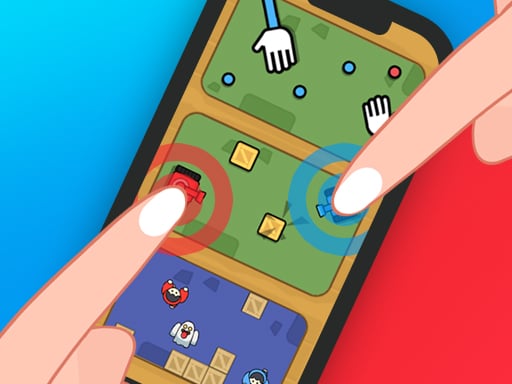
About 2 Player Mini Challenge
2 Player Mini Challenge is an accessible casual game collection built for quick head-to-head competition on a single screen. Designed for either solo play against computer-controlled AI or shared-screen rivalry with a companion, the title emphasizes quick reactions and straightforward interaction. Its clean, minimalist visual style keeps the focus entirely on competitive timing and personal skill, making it easy to jump directly into duels with friends, family, or coworkers.
2 Player Mini Challenge delivers a suite of compact party-style mini-games designed to be played immediately without complicated setup. Whether facing an AI opponent in solo practice or sharing your screen with a partner, every activity revolves around rapid inputs, visual clarity, and reactive decision-making. The minimalist presentation strips away unnecessary clutter, allowing both players to track the action clearly without distraction.
The core loop focuses on direct, round-based confrontations where precision and reflex speed determine the outcome. Because games can be shared on a single device, the experience encourages social play and quick rematches. Players can test their hand-eye coordination against responsive computer rivals or turn any casual gathering into a friendly, fast-paced tournament.
Your goal
The primary objective in 2 Player Mini Challenge is to outperform your rival in fast-paced head-to-head mini-games. Whether attempting to defeat the AI or outscore a human friend sharing the same display, your goal is to react faster, time your inputs accurately, and secure round victories through sharper reflexes and consistent focus.
How to play 2 Player Mini Challenge
1. Launch 2 Player Mini Challenge in your browser on desktop or mobile.
2. Select whether you want to play alone against the AI or challenge another person on the same device.
3. Observe the on-screen prompt and familiarize yourself with your designated tap or click area.
4. React quickly to the visual cues by tapping or clicking to execute your moves before your rival does.
5. Complete the round, review the match outcome, and start another challenge to test your reflexes again.
Controls and device support
2 Player Mini Challenge uses straightforward mouse click or touch tap inputs to interact with games and navigate menus on both desktop and mobile screens.
- Controls: Mouse or touch
- Device support: Desktop + mobile
- Game frame: 750 x 1334
What makes the challenge interesting
At its core, 2 Player Mini Challenge emphasizes rapid reflex processing and direct mechanical competition. Unlike complex strategy titles that require long onboarding times, this game demands instant visual recognition and swift, deliberate physical execution. Players must balance the urge to strike early with the patience required to avoid mistimed inputs, creating tense micro-moments in every exchange.
The shared-device dynamic introduces a psychological layer to competitive play. Competing shoulder-to-shoulder means players must maintain composure while monitoring their opponent's physical pacing, making quick calibration and calm reaction speeds essential skills across every mini-challenge.
Tips for 2 Player Mini Challenge
- Keep your finger or mouse pointer resting close to your action zone to eliminate travel delay when reacting to sudden visual cues.
- Practice in single-player AI mode first to understand the timing rhythms of each mini-challenge before engaging in competitive duels with friends.
- Focus on visual cues rather than trying to anticipate early; premature clicks or taps often lead to missed scoring opportunities.
- Ensure both players have comfortable screen access during local matches so neither participant suffers from obstructed visibility or cramped positioning.
Playing on different devices
Built with a native portrait resolution of 750 by 1334 pixels, 2 Player Mini Challenge naturally fits handheld smartphones and tablets while remaining fully playable on desktop web browsers. On mobile hardware, each player can tap their side of the touchscreen directly, creating an organic tabletop-style party experience.
When running on desktop computers, players interact via mouse clicks. For optimal two-player comfort on larger screens, position the window centrally so both competitors can easily view the action without visual obstruction.
The skills behind the game
Belonging to the hypercasual and two-player party categories, 2 Player Mini Challenge focuses on frictionless onboarding and bite-sized gameplay sessions. By stripping away complicated rulebooks and deep control schemes, hypercasual party titles allow players of any skill level to compete on equal footing right away.
HTML5 browser technology ensures the game runs instantly across modern platforms without requiring downloads or installations. This instant accessibility makes it well-suited for brief social breaks, casual classroom matches, or quick workplace challenges where speedy entertainment is the primary draw.
Who will enjoy this game
Players looking for a versatile 2 player mini challenge will appreciate how effortlessly this collection switches between solo reflex training and shared social competition. Because it requires only a single device, it functions well during travel, casual breaks, or friendly meetups where quick entertainment is needed.
As a lightweight 2 player mini challenge game, the focus remains squarely on rapid reaction times and minimalist visual clarity. It serves as an engaging way to test hand-eye coordination against responsive computer AI before bringing friends into the mix for intense, lighthearted rematches.
Frequently asked questions
Can I play 2 Player Mini Challenge by myself? Yes. 2 Player Mini Challenge includes dedicated AI support, enabling solo players to practice their reaction timing and challenge computer opponents without needing a second participant.
Do both players need separate devices to compete? No. The game is designed specifically for same-device local play, meaning two people can compete head-to-head on a single shared screen or touchscreen.
What controls are used to play? The game uses standard mouse clicks on desktop computers and direct screen taps on mobile devices for all menus and mini-game interactions.
Something not right?
Tell us if the game does not load, the information is wrong or the content needs review.
Report a problem ›